
Part 1 of a 4-part beginner series on OpenClaw
Introduction
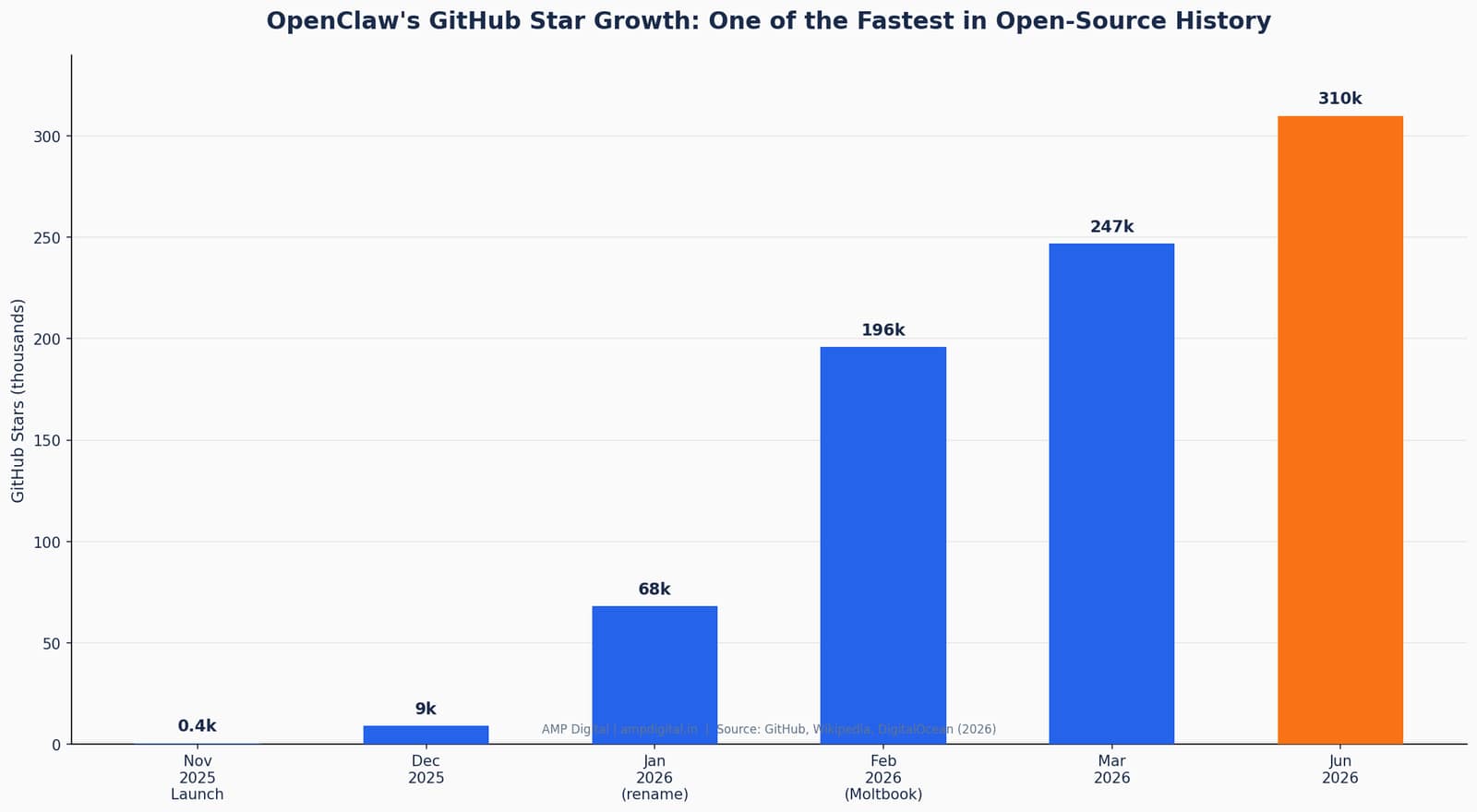
If your LinkedIn or X feed has been full of a cartoon lobster lately, you’ve spotted OpenClaw — and you are not imagining the sudden spike in mentions. OpenClaw is a free, open-source personal AI assistant that runs on a device you control — your laptop, a Mac Mini, even a Raspberry Pi — instead of living inside someone else’s app. It first appeared under the name Warelay in November 2025, was built by Austrian developer Peter Steinberger, and by mid-2026 had crossed 310,000 GitHub stars, making it one of the fastest-growing open-source projects in history.
This guide is written for AI novices — no engineering background required. By the end, you will understand what OpenClaw actually is, how it is fundamentally different from the AI apps you already use, and why it matters even if you never install it yourself. This is the first post in a 3-part series: Part 2 covers what OpenClaw can actually do day-to-day, and Part 3 walks through setup and safety basics.
"OpenClaw is a self-hosted agent runtime and message router that acts as a personal AI assistant running on your own machine."
— DigitalOcean, "What Is OpenClaw? Your Open-Source AI Assistant for 2026"
Section 1: What Is OpenClaw?
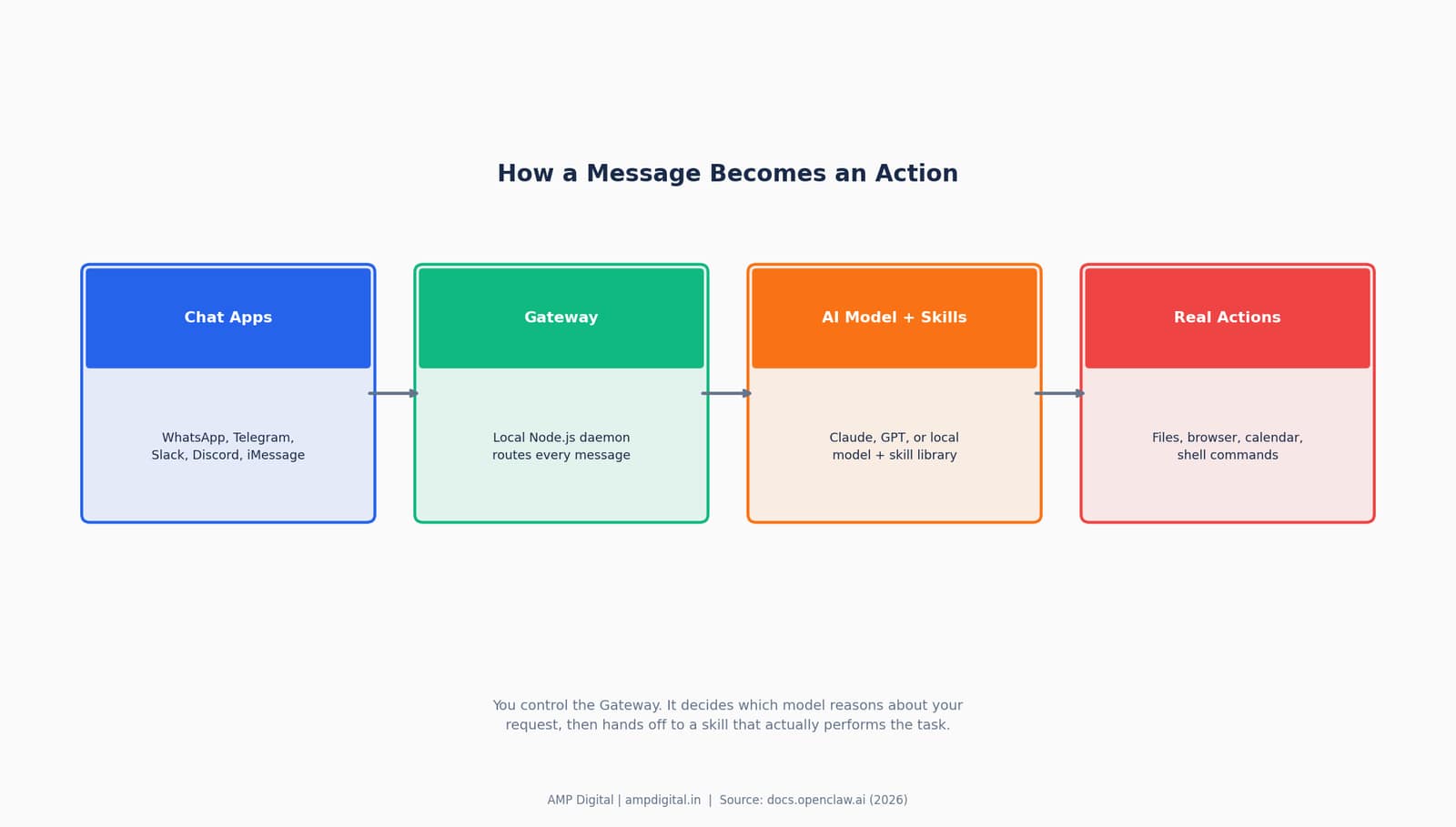
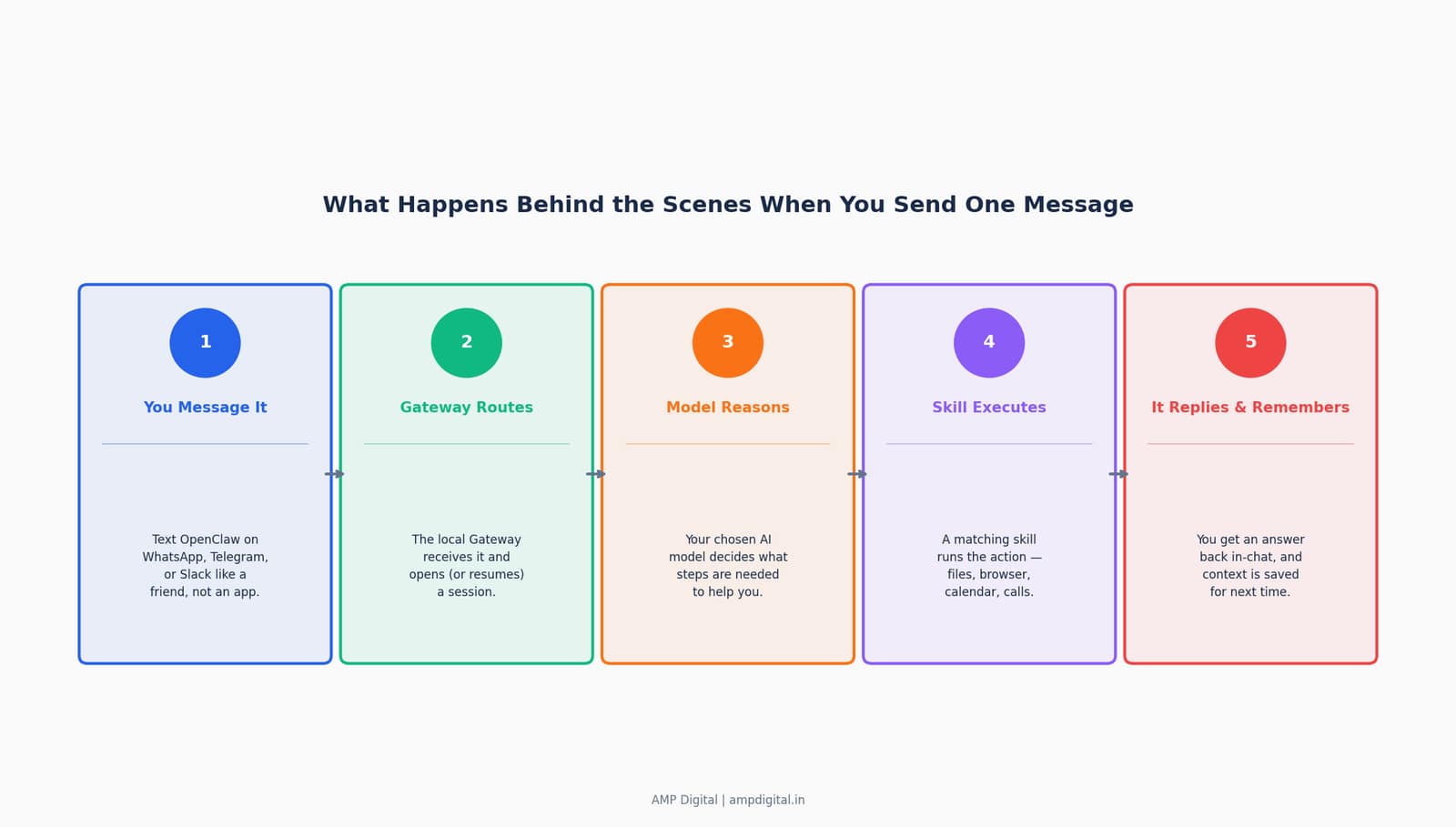
OpenClaw is an open-source, self-hosted AI agent that connects a large language model to the chat apps and tools you already use, then gives it permission to actually act on your behalf. It is not a new chatbot competing with ChatGPT for your attention inside a browser tab — it is software you run yourself, on your own hardware, that reaches out to you through WhatsApp, Telegram, Slack, Discord, and dozens of other channels.
The project has been renamed twice in its short life: it launched as Warelay in November 2025, was derived from an earlier personal tool called Clawd (named after Anthropic’s Claude), briefly became "Moltbot" in January 2026 following a trademark dispute, and settled on "OpenClaw" three days later. Understanding OpenClaw is easiest through a three-layer breakdown of what it actually consists of.
Layer | What It Is | What It Does For You |
Interface Layer | Chat app connections (WhatsApp, Telegram, Slack, Discord, iMessage, Signal, and 20+ more) | Lets you talk to it exactly like you’d text a person — no new app to learn |
Reasoning Layer | The AI model you choose — Claude, GPT models, or a local model via Ollama | Understands your request and plans the steps needed to complete it |
Action Layer | The Gateway + Skills system, running on your own device | Actually executes tasks: reads files, browses the web, runs scripts, updates calendars |
KEY STAT
OpenClaw grew from roughly 9,000 GitHub stars in December 2025 to over 247,000 by March 2026, and past 310,000 by mid-2026 — one of the fastest adoption curves ever recorded for an open-source project.
Section 2: Why It Matters — Even If You’re Not Technical
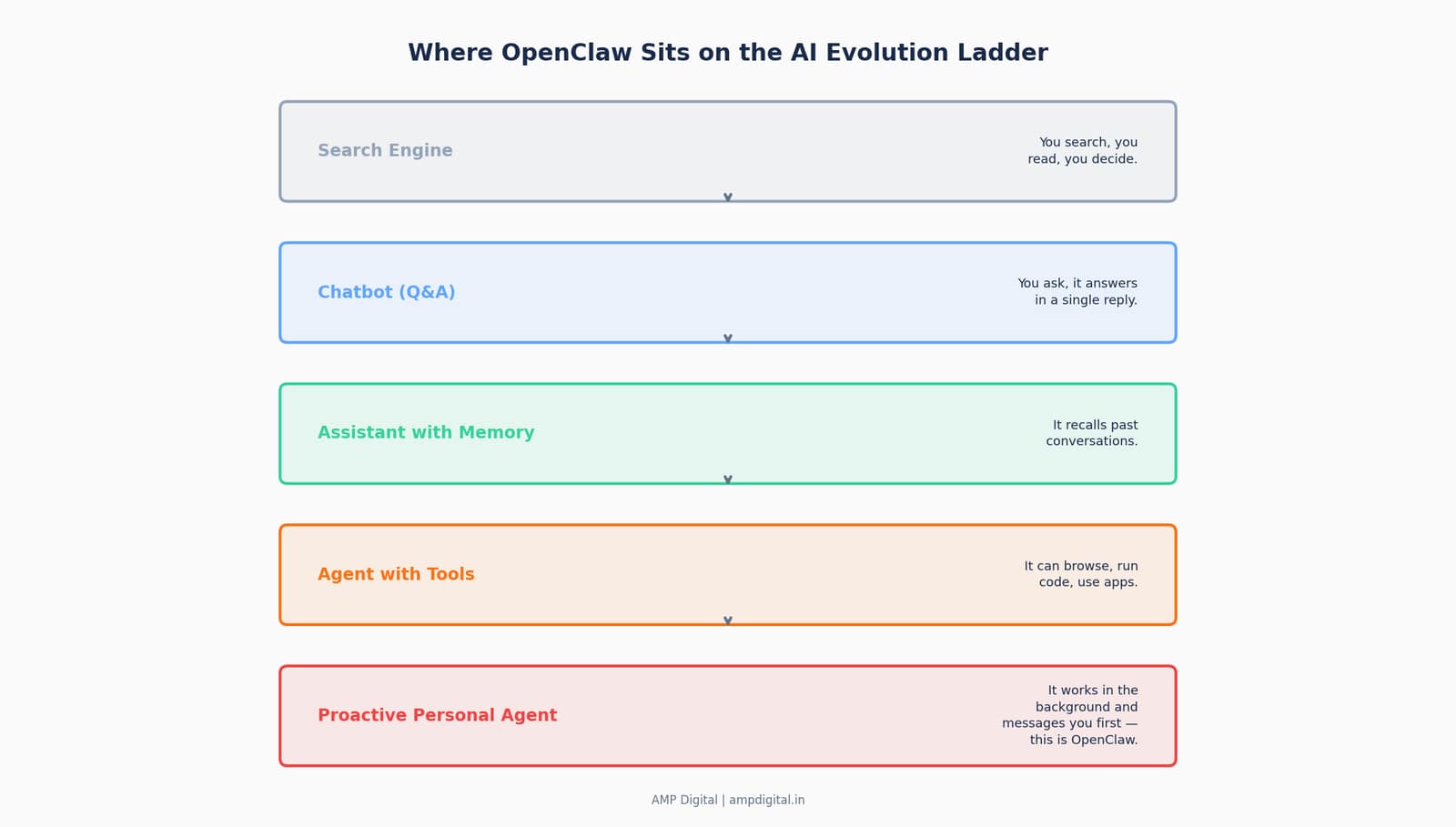
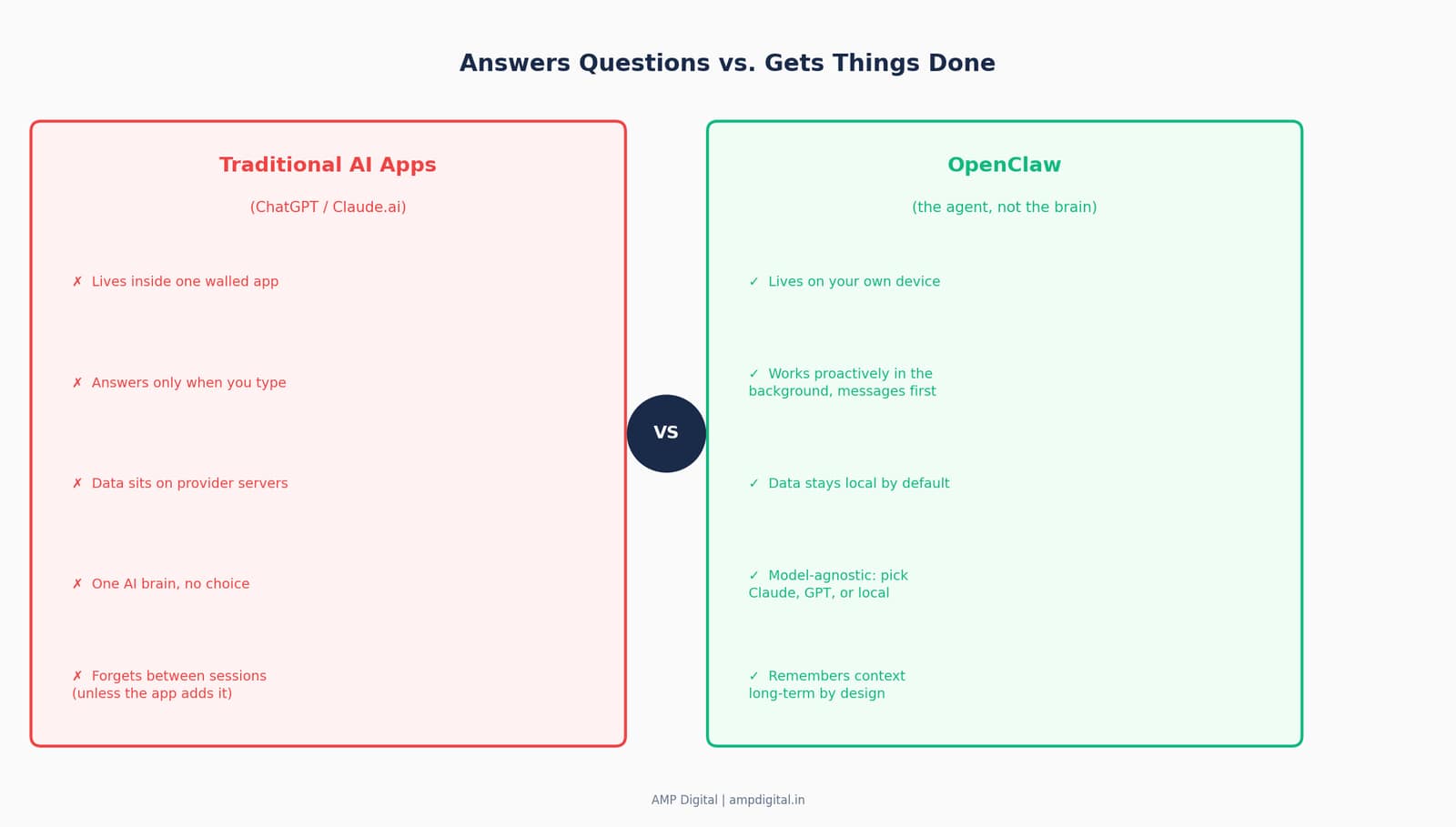
OpenClaw matters because it represents the first mainstream wave of AI moving from "answers questions" to "gets things done." Every AI tool you have used so far — ChatGPT, Claude.ai, Gemini — shares one pattern: you open an app, type something, get a reply, and the interaction ends. OpenClaw breaks that pattern by staying on, watching for triggers, and taking real-world action without you needing to re-open an app each time.
Understanding this shift now, even at a surface level, puts you ahead of a curve that is moving unusually fast. The project’s own site frames it directly: OpenClaw is described as an agentic interface for autonomous workflows, not simply a chat-based question-answering tool.
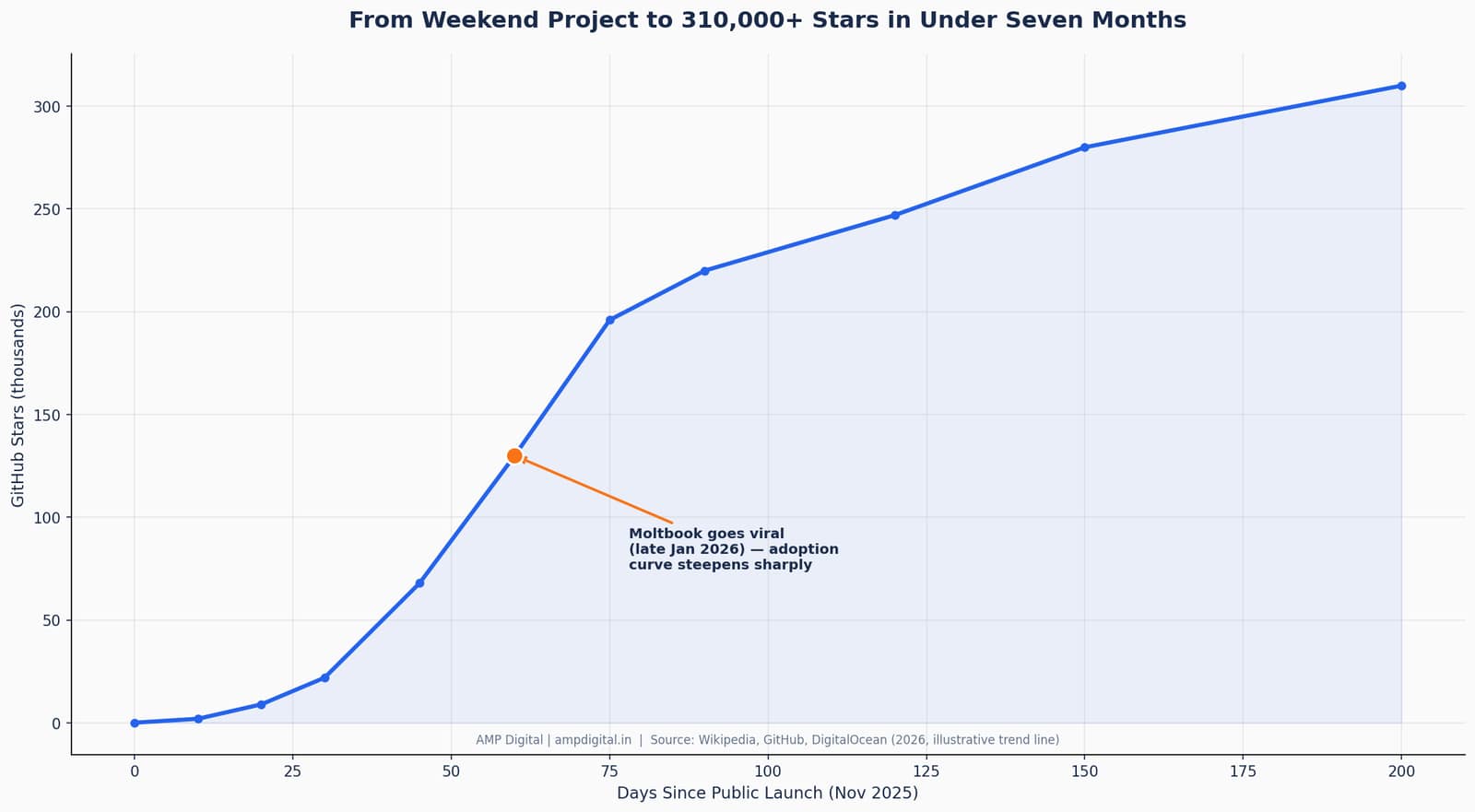
Milestone | Date | Significance |
Launch as Warelay | Nov 2025 | First public release, derived from the Clawd personal project |
~9,000 GitHub stars | Dec 2025 | Early developer-community adoption |
Renamed Moltbot → OpenClaw | Jan 27–30, 2026 | Trademark dispute with Anthropic forces a rebrand within days |
Moltbook launches | Late Jan 2026 | A social network built for AI agents drives viral mainstream interest |
247,000+ stars | Mar 2, 2026 | Among the fastest-growing repos in GitHub history |
OpenClaw Foundation announced | Feb 14, 2026 | Non-profit stewardship established as creator joins OpenAI |
"Current level of open-source apps capabilities: does everything, connects to everything, remembers everything. It’s all collapsing into one unique personal OS."
— @jakubkrcmar, OpenClaw community showcase
Section 3: How OpenClaw Is Different From ChatGPT and Claude.ai
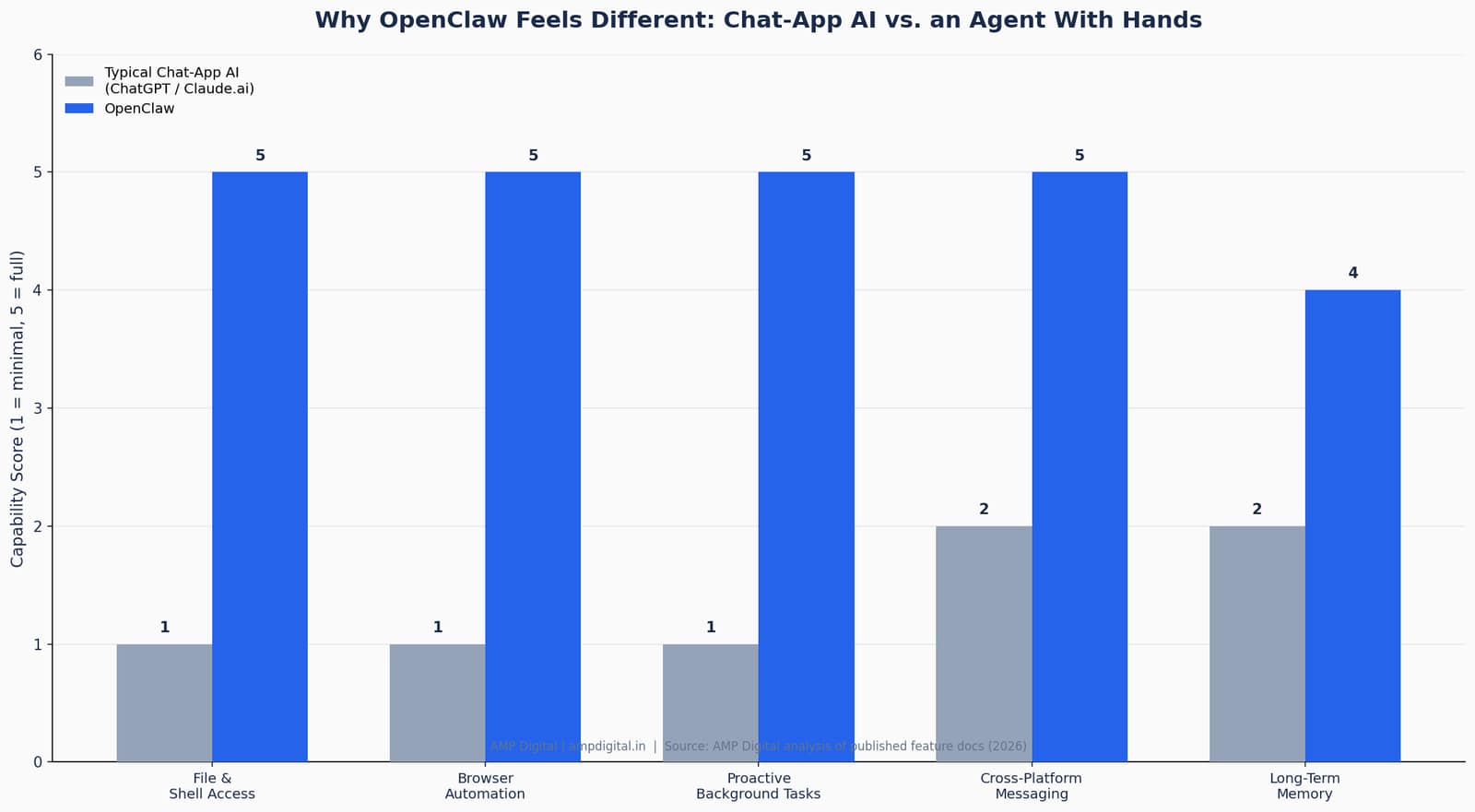
The single most useful mental model for a beginner is this: ChatGPT and Claude.ai are request-response tools, while OpenClaw is a continuously running agent. Here is what that means in practice.
- ChatGPT / Claude.ai: you open an app, type a question, get an answer, done. The interaction has a clear start and end, and the tool only acts while you are actively looking at it.
- OpenClaw: you message it on WhatsApp, Telegram, Slack, or another chat app you already use — like texting a very capable assistant — and it can actually do things: read files, browse the web, run scripts, manage your calendar, check on things in the background, and remember context over time.
- A single OpenClaw task typically triggers three to eight model calls behind the scenes as it reasons, checks tool results, and decides what to do next — all before you see a single reply.
PRO TIP
If you have only ever used AI through a browser tab, think of OpenClaw less as "a smarter chatbot" and more as "a junior employee who happens to live inside your computer." That mental shift makes every other difference in this guide click faster.
Section 4: The Five Things That Make OpenClaw Click for Beginners
Five characteristics separate OpenClaw from every AI tool you have used before. Together, they explain both why it has grown so fast and why it deserves a careful, informed approach.
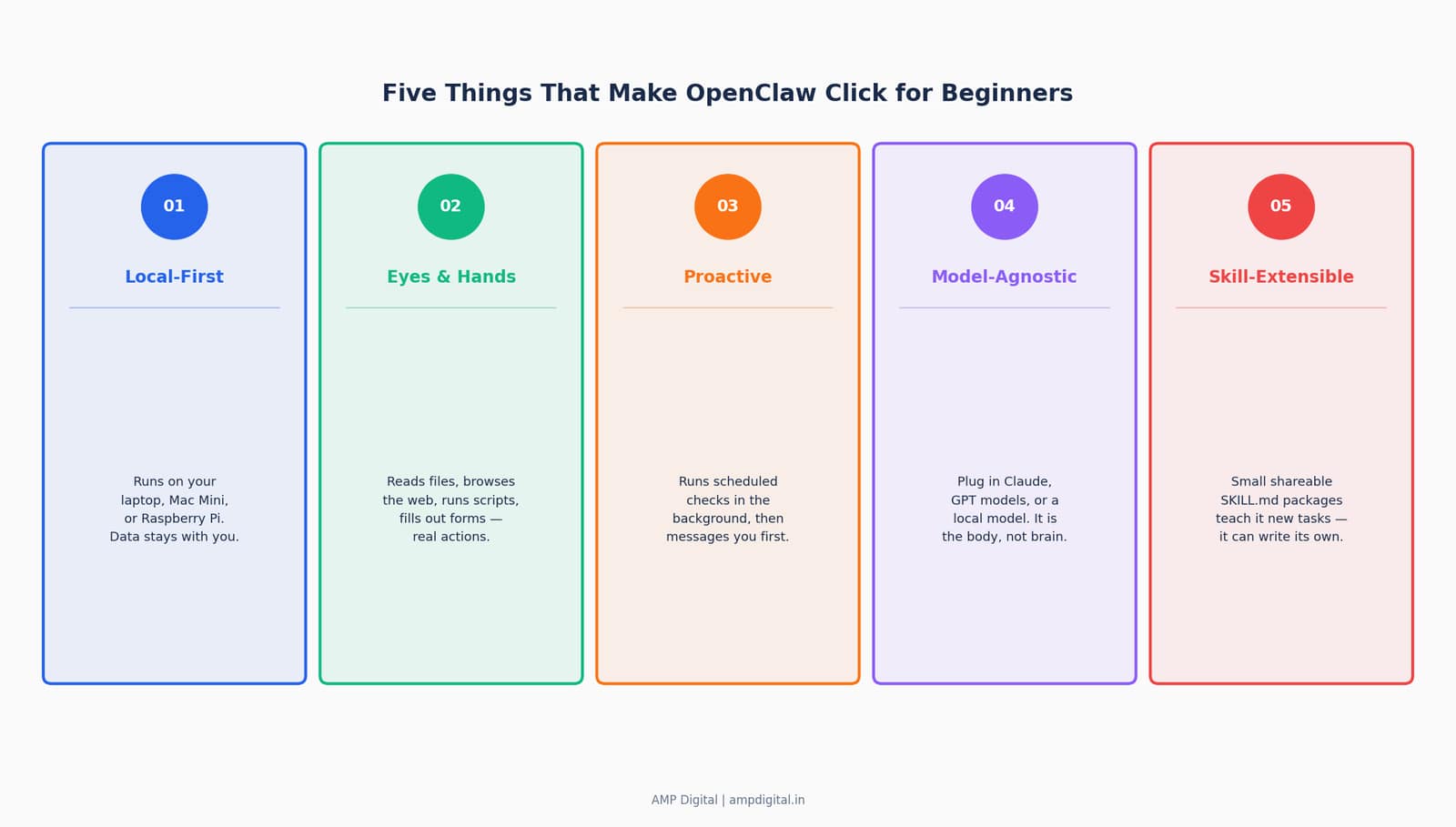
Trait | What It Means | Why It Matters |
Local-first | Runs on your device (laptop, Mac Mini, Raspberry Pi), not a company’s server | Your data and context stay local by default — not in a walled garden |
Eyes & hands | Has real tool access: files, browser, shell, calendar | It is not just answering — it can take action on your behalf |
Proactive | Runs scheduled checks and background tasks via a heartbeat scheduler | It messages you when something needs attention, instead of waiting to be asked |
Model-agnostic | Works with Claude, GPT models, or local models via Ollama | You choose the "brain" — OpenClaw is only the "body" |
Skill-extensible | New tasks are added through small, shareable SKILL.md packages | The community — and the agent itself — can teach it new capabilities |
"The agent has direct access to your file system, shell, browser, email, calendar, and any other service you grant it. That is exactly what makes it powerful and exactly what keeps security teams up at night."
— Emergent, "What is OpenClaw? Complete guide to the open-source AI agent" (2026)
Section 5: What OpenClaw Can Actually Do — Real Examples
Beginners often ask what a "proactive AI agent" looks like in practice. A few documented, real-world examples make the concept concrete.
- A software engineer tasked his OpenClaw agent with buying a car; it scraped local dealer inventories, filled out contact forms, and spent several days playing dealerships against each other by forwarding competing quotes — negotiating $4,200 off the purchase price while he slept.
- The Zilliz team connected OpenClaw to Slack as a community support assistant for their Milvus project; setup took 20 minutes, and it now answers common questions and points users to documentation automatically.
- Law firms and freelance legal professionals have used OpenClaw with local models to process contracts, extract key clauses, and flag unusual terms — entirely on local hardware, so no client data leaves the machine.
KEY STAT
DigitalOcean documents 50+ integrations spanning chat providers, AI models, productivity tools, smart home devices, and automation platforms — all usable from a single conversation in an app like WhatsApp or Telegram.
Section 6: Tools, Models, and the Skills Ecosystem
Two design choices give OpenClaw its flexibility: it is model-agnostic, and it is extensible through a skills system.
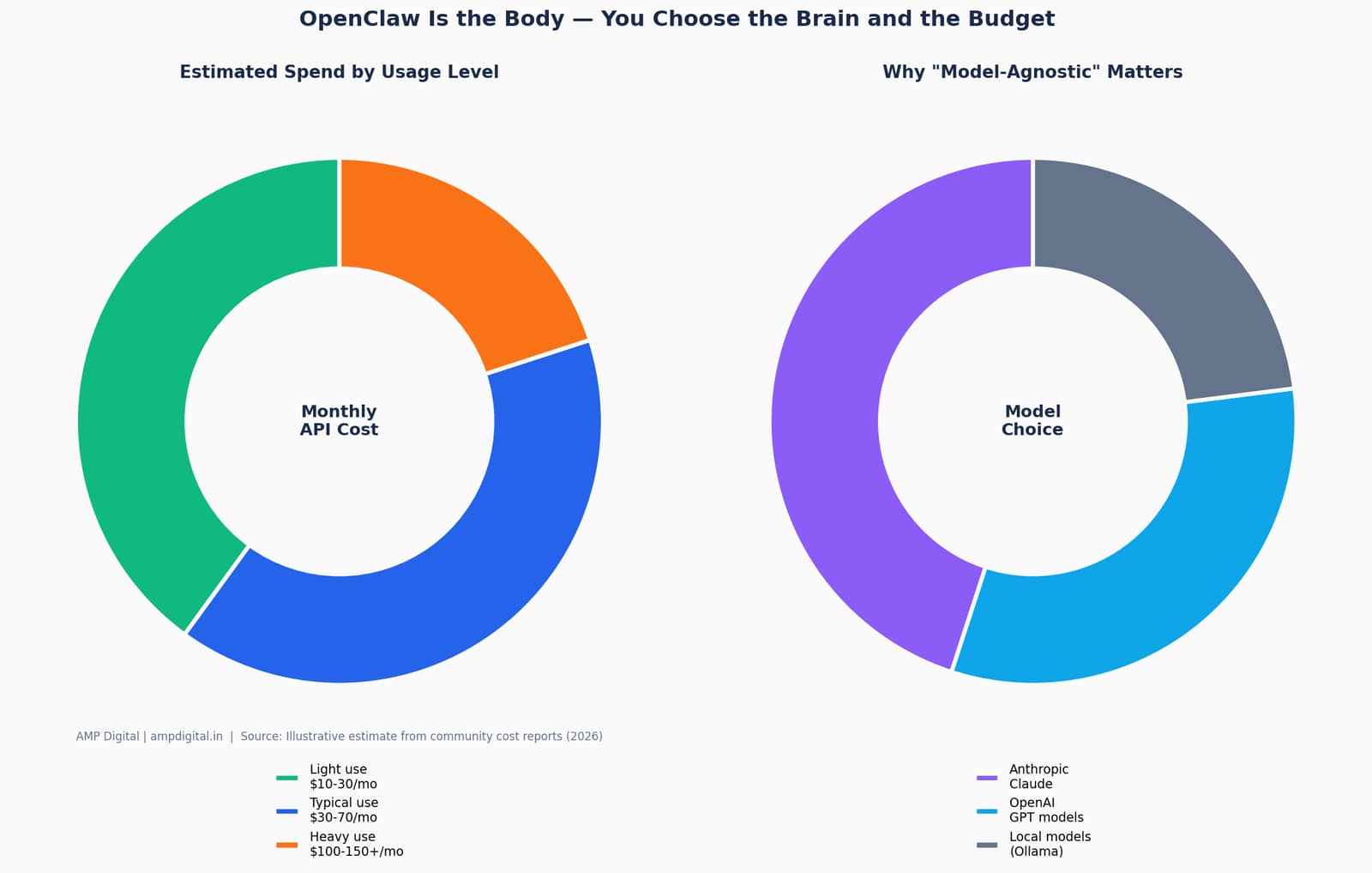
Option | What It Is | Best For |
Anthropic Claude (API) | Cloud model, pay-as-you-go pricing | Strong reasoning, general-purpose tasks |
OpenAI GPT models | Cloud model, pay-as-you-go pricing | Broad tool support, wide ecosystem |
Local models (Ollama) | Runs entirely on your own hardware | Maximum privacy, zero API cost, lower capability ceiling |
Community Skills | Shareable SKILL.md instruction packages | Repeatable workflows without custom code |
UPDATE
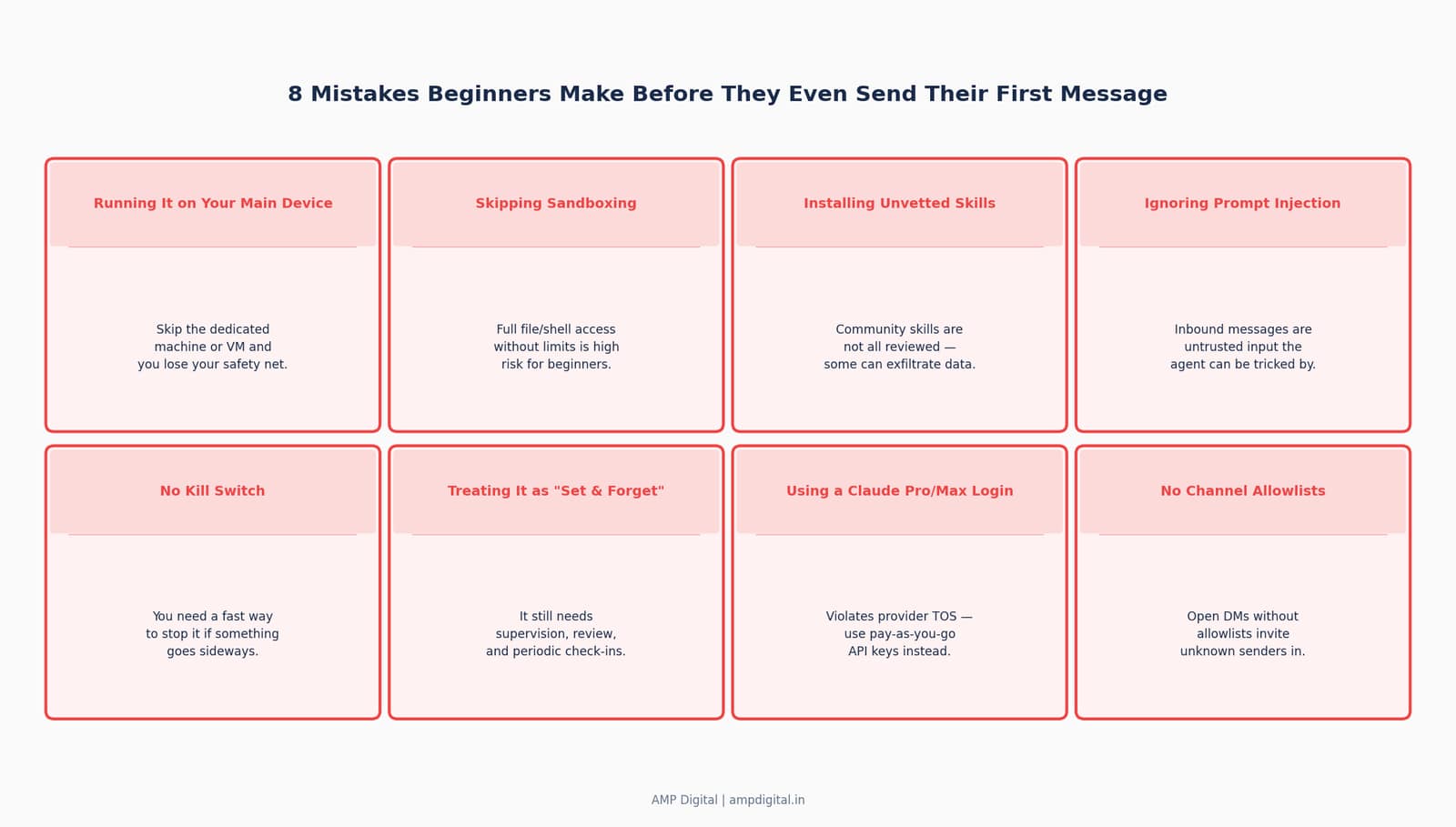
Using a Claude Pro or Max subscription login with OpenClaw violates Anthropic’s Terms of Service. Beginners must use a pay-as-you-go API key instead — a detail worth knowing before you experiment.
Section 7: Common Mistakes Beginners Make
OpenClaw’s power comes from broad system access — which is exactly what makes it easy to misconfigure. Cisco’s AI security research team tested a third-party OpenClaw skill and found it performed data exfiltration and prompt injection without the user’s awareness, and one of the project’s own maintainers has publicly warned that beginners unfamiliar with the command line should be cautious.
WARNING
One OpenClaw maintainer, known as "Shadow," warned on the project’s Discord: "if you can’t understand how to run a command line, this is far too dangerous of a project for you to use safely." Treat that warning as a genuine starting filter, not hyperbole.
Section 8: Best Practices Before You Dive In
None of the risks above mean beginners should avoid OpenClaw — they mean beginners should approach it deliberately. A few best practices, expanded fully in Part 3, are worth knowing now.
- Run it on a dedicated device or virtual machine, not your primary laptop, so a mistake never touches your main files.
- Start with a sandboxed or limited-permission mode rather than granting full file and shell access on day one.
- Only install community skills from reviewed, reputable sources, since the skill repository is not fully vetted.
- Set channel allowlists so only known contacts can message your agent, especially in group chats.
- Treat every inbound message — even one from a "friendly" source — as untrusted input the agent could be manipulated by.
BEST PRACTICE
Think of your first week with OpenClaw as a supervised trial, not a "set and forget" deployment. Review what it did each day until you trust its judgment on a given task type.
Section 9: OpenClaw on the AI Evolution Ladder
It helps to place OpenClaw against the broader arc of AI assistant development, from simple search to fully proactive agents.
Example | What Happened | Why It’s Notable |
Car purchase negotiation | Agent scraped dealer sites, filled forms, and negotiated $4,200 off | Fully autonomous multi-day negotiation without supervision |
Milvus community Slack bot | Connected to Slack in 20 minutes to triage community questions | Shows low setup friction for a genuinely useful integration |
MoltMatch dating profile | An agent created a dating profile without its owner’s explicit direction | Highlights real accountability and consent risks with autonomous agents |
Section 10: Where OpenClaw Goes From Here
OpenClaw’s trajectory in 2026 has already reshaped how quickly a personal AI agent can go from side project to global phenomenon. Chinese developers have adapted it for DeepSeek models and domestic super-apps like WeChat, companies including Tencent and Z.ai have announced OpenClaw-based services, and its creator has moved to establish a non-profit OpenClaw Foundation for long-term stewardship as he joins OpenAI.
For beginners, the practical takeaway is simpler than the headlines suggest: this is the first widely visible example of AI shifting from a tool you consult to an assistant that works alongside you. Whether or not you ever install it yourself, understanding the shift now means you will recognize the next five projects that follow the same pattern.
UPDATE
A review in Platformer cited OpenClaw’s flexibility and open-source licensing as a genuine strength of the project, even as reporting has continued to surface accountability questions around what autonomous agents do when granted broad access.
Frequently Asked Questions
Is OpenClaw the same as ChatGPT or Claude.ai?
No. OpenClaw is not an AI model — it is an open-source agent runtime that connects an AI model of your choice (including Claude or GPT models) to messaging apps and gives it the ability to take real actions. ChatGPT and Claude.ai are request-response apps you visit; OpenClaw is software you run yourself that reaches out to you.
Is OpenClaw free?
Yes, the OpenClaw software itself is free and open-source under the MIT license. Your ongoing costs come from the AI model API you connect it to — typically $10–$30/month for light use, $30–$70/month for typical use, and $100–$150+/month for heavy automation, though local models can bring that close to zero.
Do I need to know how to code to use OpenClaw?
Basic comfort with a command line is currently expected. One of the project’s own maintainers has warned that beginners unfamiliar with running command-line tools should be cautious until they build that comfort or get help from someone who has it.
Why is OpenClaw associated with a lobster?
OpenClaw was built for "Molty," a space-lobster-themed AI assistant persona created by Peter Steinberger and the community, and the project briefly carried the name "Moltbot" before its final rename — which is why lobster imagery has become closely associated with the brand.
Is OpenClaw safe to use?
It can be, if set up carefully. Because it can access files, email, calendars, and messaging platforms, misconfigured or exposed instances present real security and privacy risks, and it is susceptible to prompt injection attacks through untrusted inbound messages. Running it in an isolated environment with limited permissions is strongly recommended for beginners; Part 3 of this series covers the full safety checklist.
What can OpenClaw actually do day-to-day?
Documented use cases include managing calendars and reminders across apps like Notion and Things 3, triaging and drafting email replies, monitoring competitor websites for a daily briefing, automating browser-based tasks like filling forms, and running scheduled DevOps or codebase checks. Part 2 of this series covers a full breakdown of everyday use cases.
Conclusion
OpenClaw is not simply another chatbot — it is an early, highly visible example of AI moving from passive question-answering to active, proactive task execution on hardware you control. It is local-first, model-agnostic, extensible through skills, and genuinely capable of taking real-world action, which is precisely what has driven it past 310,000 GitHub stars in under a year. That same power is also why it demands a careful, informed approach rather than a casual install.
SUMMARY
Starter checklist before Part 2:
1. Understand OpenClaw runs on YOUR device, not a company server
2. Know it can take real actions — not just answer questions
3. Remember it is model-agnostic — you choose Claude, GPT, or local models
4. Recognize the skills system as its extensibility engine
5. Bookmark this series — Part 2 covers real day-to-day use cases, Part 3 covers setup and safety
In Part 2, I’ll break down exactly what OpenClaw can do day-to-day (with real examples), and in Part 3, the practical setup steps and safety basics every beginner should know before trying it.
References
- Wikipedia. "OpenClaw." Accessed 2026.
- DigitalOcean. "What is OpenClaw? Your Open-Source AI Assistant for 2026." 2026.
- Milvus Blog (Zilliz). "What Is OpenClaw? Complete Guide to the Open-Source AI Agent." February 2026.
- Emergent. "What is OpenClaw? Complete guide to the open-source AI agent (2026)." 2026.
- GitHub. openclaw/openclaw repository. github.com/openclaw/openclaw.
- OpenClaw official documentation. docs.openclaw.ai.
- OpenClaw official site. openclaw.ai.
- AMP Digital analysis and community showcase quotes, compiled 2026.