
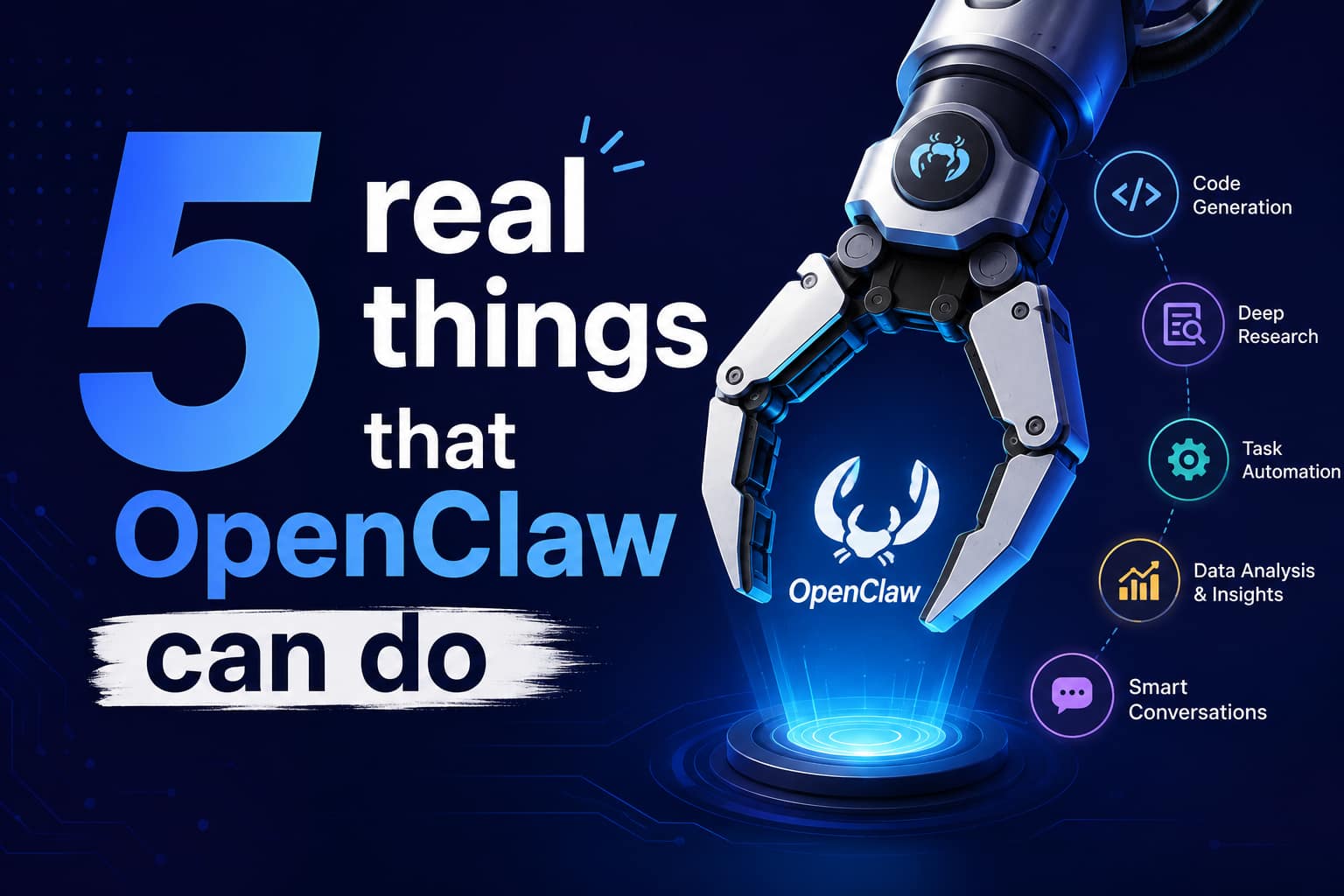
Part 2 of a beginner’s guide to OpenClaw — what the "AI that actually does things" looks like once it’s doing them
5 Real Things OpenClaw Can Do for You (With Examples)
"AI assistant" sounds abstract until you watch one actually clear your inbox, open a pull request, or remind you to call a client — all from a text message you sent on a walk. That is the gap this article closes. OpenClaw, the open-source personal AI agent that connects to WhatsApp, Telegram, Discord, Slack, and a dozen other apps you already use, has gone from a weekend project in November 2025 to the most-starred software repository on GitHub. But star counts do not tell you what to actually do with it on a Tuesday morning.
This is Part 2 of our beginner series on OpenClaw. In Part 1, we covered what OpenClaw is and how the pieces fit together. Here, we get concrete: five real, specific jobs people are already handing to OpenClaw, in plain language, with the exact kind of message you would send to trigger each one. By the end, you will know what "AI assistant" means in practice — and what to keep in mind before you hand over the keys, which we cover fully in Part 3.
"A smart model with eyes and hands at a desk with keyboard and mouse. You message it like a coworker and it does everything a person could do with that Mac mini."
— @nathanclark_, OpenClaw user testimonial, 2026
What Is OpenClaw, in One Paragraph
OpenClaw is a free, self-hosted AI agent that runs on your own computer or a small server and connects to the messaging apps you already use — WhatsApp, Telegram, Discord, Slack, Signal, and iMessage among others — so you can message it like a person and have it actually take action: reading files, browsing the web, managing your calendar, or running code. It was built by Austrian developer Peter Steinberger, launched under the name Warelay in November 2025, and later renamed Moltbot and then OpenClaw before OpenAI acquired the project and moved it to an independent, still open-source foundation in February 2026.
Three layers make it work, and understanding them makes the five examples below much easier to picture:
Layer | What it does | Analogy |
Gateway | The single process that manages every messaging connection and routes each incoming message to the right agent session. | The receptionist who answers every call and transfers it to the right desk. |
Skills | Portable, installable instructions (a folder with a SKILL.md file) that teach the agent how to use a specific tool or service. | A staff member’s training manual for one specific job. |
Channels | The messaging platforms themselves — WhatsApp, Telegram, Discord, and 20+ others — through which you talk to the agent. | The phone lines and doors people can use to reach the office. |
Pro Tip
You do not need to touch a terminal to see OpenClaw work. The fastest path is connecting one channel — most beginners start with Telegram because it is the most stable — and sending your first message.
Why This Matters Right Now
OpenClaw’s growth is the clearest signal yet that people want an AI assistant that lives in their existing apps and actually finishes tasks, not one more chat window that only talks back. The project crossed 100,000 GitHub stars within two months of launch, then kept climbing past React, Linux, and every other software project except a handful of curated lists.
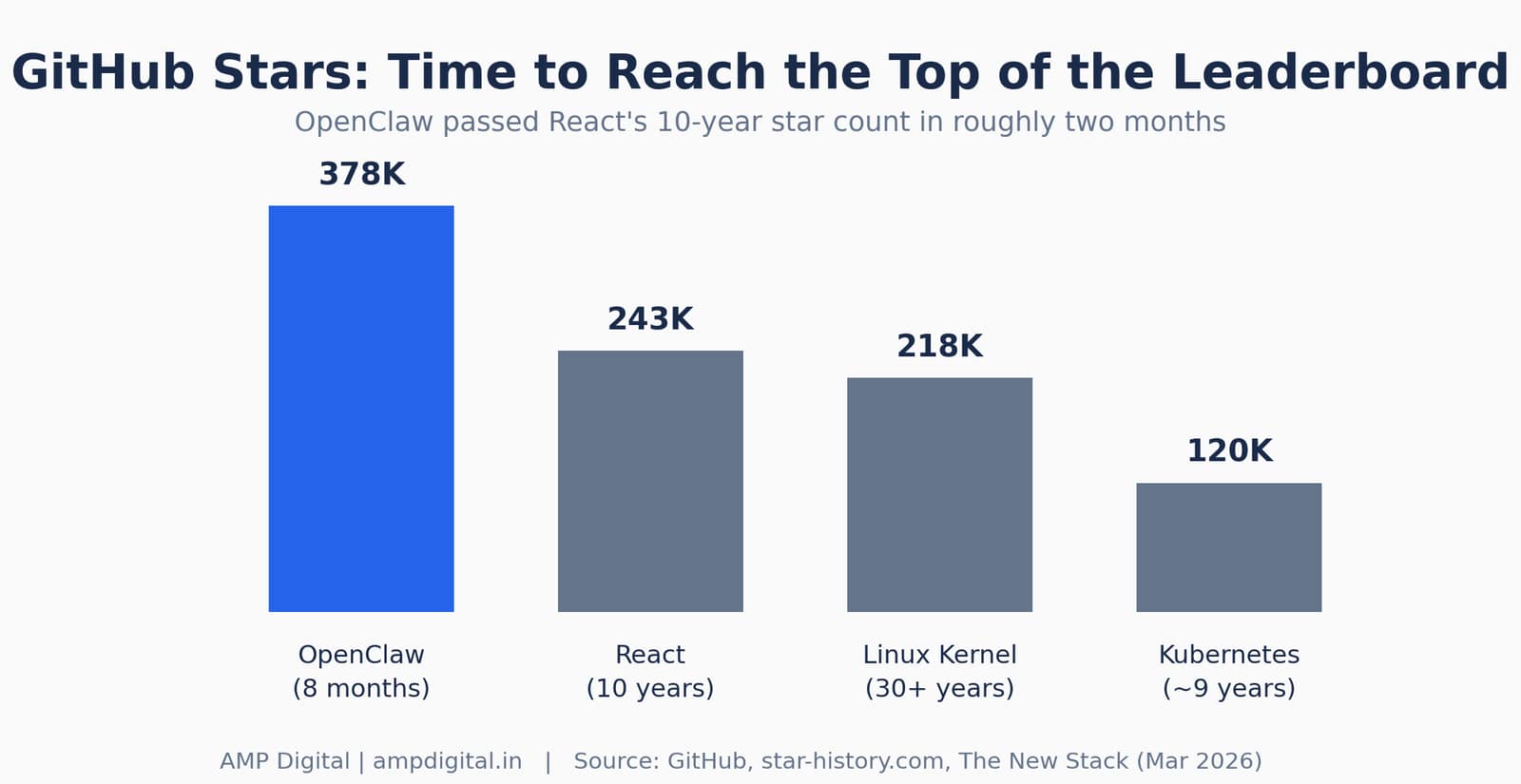
Figure 1. OpenClaw reached React’s 10-year star count in about two months.
Metric | Figure | As of |
GitHub stars | 378,000+ | June 2026 |
Monthly active users | 3.2 million | April 2026 |
ClawHub community skills | 44,000+ | April 2026 |
Running instances worldwide | 500,000+ | April 2026 |
Share of use cases that are productivity tasks | ~50% | Gitnux, 2026 |
"2026 is already the year of personal agents."
— @chrisdietr, OpenClaw user testimonial, 2026
None of that matters if you cannot picture what the agent actually does for you personally. So let’s get specific. Here are five real jobs, described the way people are actually using them today.
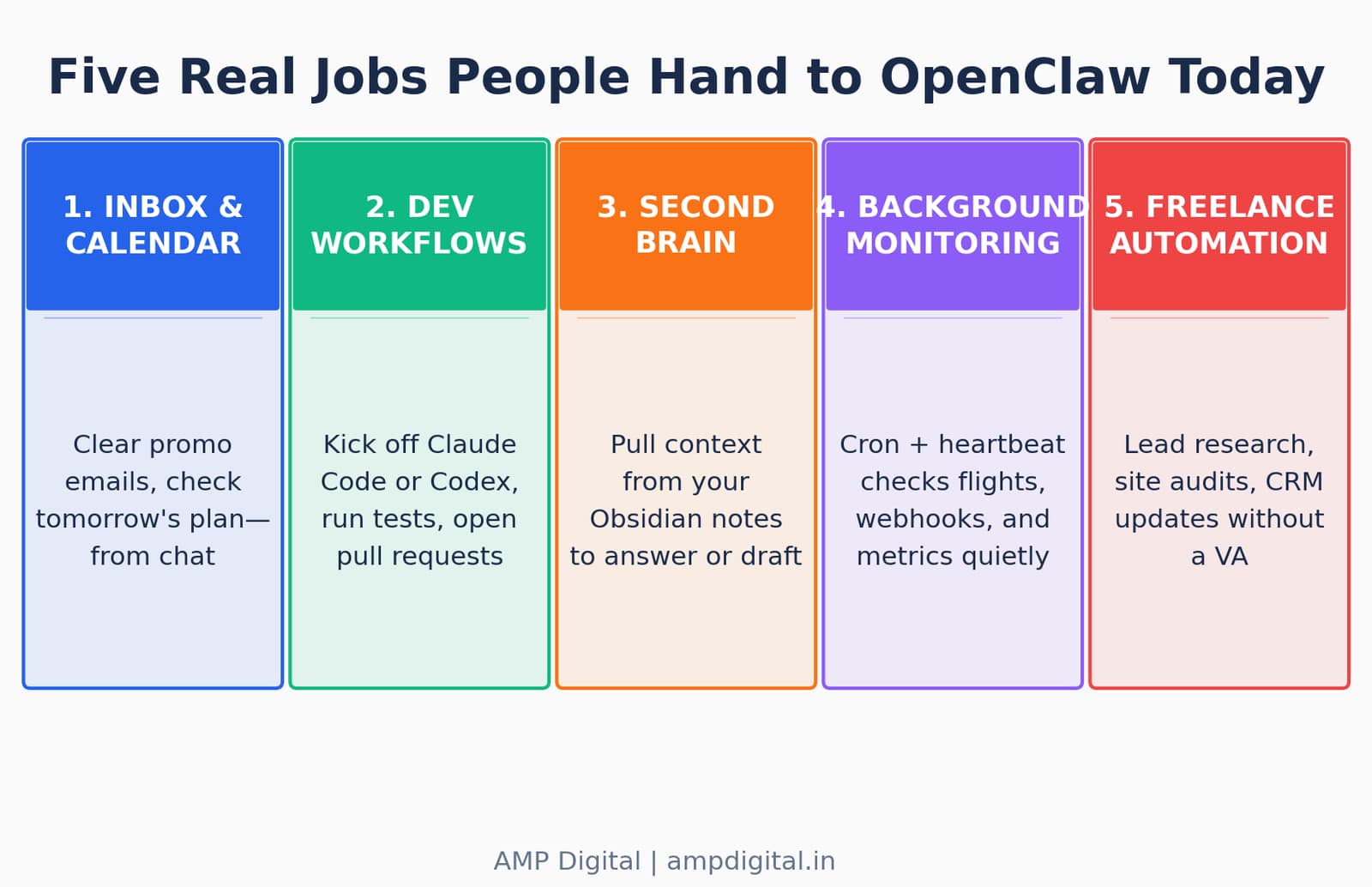
Figure 2. The five real jobs covered in this article.
Example 1: Inbox and Calendar Management
Direct answer: message OpenClaw something as simple as "clear out my promotional emails from this week" or "what’s on my calendar tomorrow" from WhatsApp or Telegram, and it handles the task directly — no app-switching required.
This is the single most common starting point for new users, because it is low-risk and immediately useful. Once OpenClaw is connected to your email and calendar through its Gmail and calendar skills, it can read, classify, draft, and — if you allow it — send or delete on your behalf.
What people are actually sending it:
- "Clear out my promotional emails from this week."
- "What’s on my calendar tomorrow?"
- "Summarize anything urgent in my inbox and draft replies."
- "Move my 2pm call to 4pm and let the other person know."
One widely cited example: a user let OpenClaw run unattended against a Gmail inbox for a few days and it classified messages by urgency, drafted reply text for review, and unsubscribed from promotional lists — clearing thousands of unread emails without the person opening the app once.
Pro Tip
Start with read-only or draft-only mode for email. Let the agent prepare replies and unsubscribe suggestions for your approval before you allow it to send or delete automatically.
Example 2: Coding and Dev Workflows
Direct answer: developers use OpenClaw to kick off Claude Code or Codex sessions remotely, run tests automatically, catch errors, and even open pull requests to fix them — without sitting at a keyboard.
OpenClaw does not replace Claude Code or Codex as your coding tool; it acts as the coordination layer that lets you launch and manage those sessions from your phone. You send a message like "fix the failing dashboard smoke test" from Telegram, and OpenClaw starts a Claude Code or Codex session on your machine, watches the output, and reports progress back to the same chat thread.
Task | Before (at your desk) | With OpenClaw (from anywhere) |
Fix a failing test | Open laptop, open terminal, run Claude Code manually | Message "fix the failing tests" from your phone |
Catch a production error | Wait to notice it, then investigate manually | Sentry webhook triggers the agent automatically |
Open a pull request | Write the fix, commit, push, open PR yourself | Agent runs the fix loop and opens the PR for review |
Review progress | Check terminal output periodically | Agent sends a status update every few iterations |
"Autonomous Claude Code loops from my phone. ‘Fix tests’ via Telegram. Runs the loop, sends progress every 5 iterations."
— @skillmcp, OpenClaw user testimonial, 2026
A separate account from X user @nateliason described running a "separate Claude subscription + Claw" setup that manages Claude Code and Codex sessions, runs tests, captures errors through a Sentry webhook, resolves them, and opens pull requests automatically.
Example 3: Personal Research and Second-Brain Building
Direct answer: connect OpenClaw to your notes app — Obsidian is the most common choice — and it can pull context from your own knowledge base to answer questions or draft content in your own voice.
Obsidian stores notes as plain Markdown files in a folder, called a vault. Because OpenClaw can already read and write files, connecting the two is mostly a matter of pointing a skill at your vault path. Once connected, the agent can search across every note you have ever written, surface connections between them, and draft new content that matches how you actually write.
What this looks like in practice:
- You ask, "What have I written about pricing models before?" and it searches your entire vault and summarizes three past notes with links back to each.
- You send a YouTube link and it extracts the key ideas, formats them in your note style with tags, and saves them to the right folder.
- It proactively mentions a note from three weeks ago when you bring up a related topic again — something most people forget they even wrote.
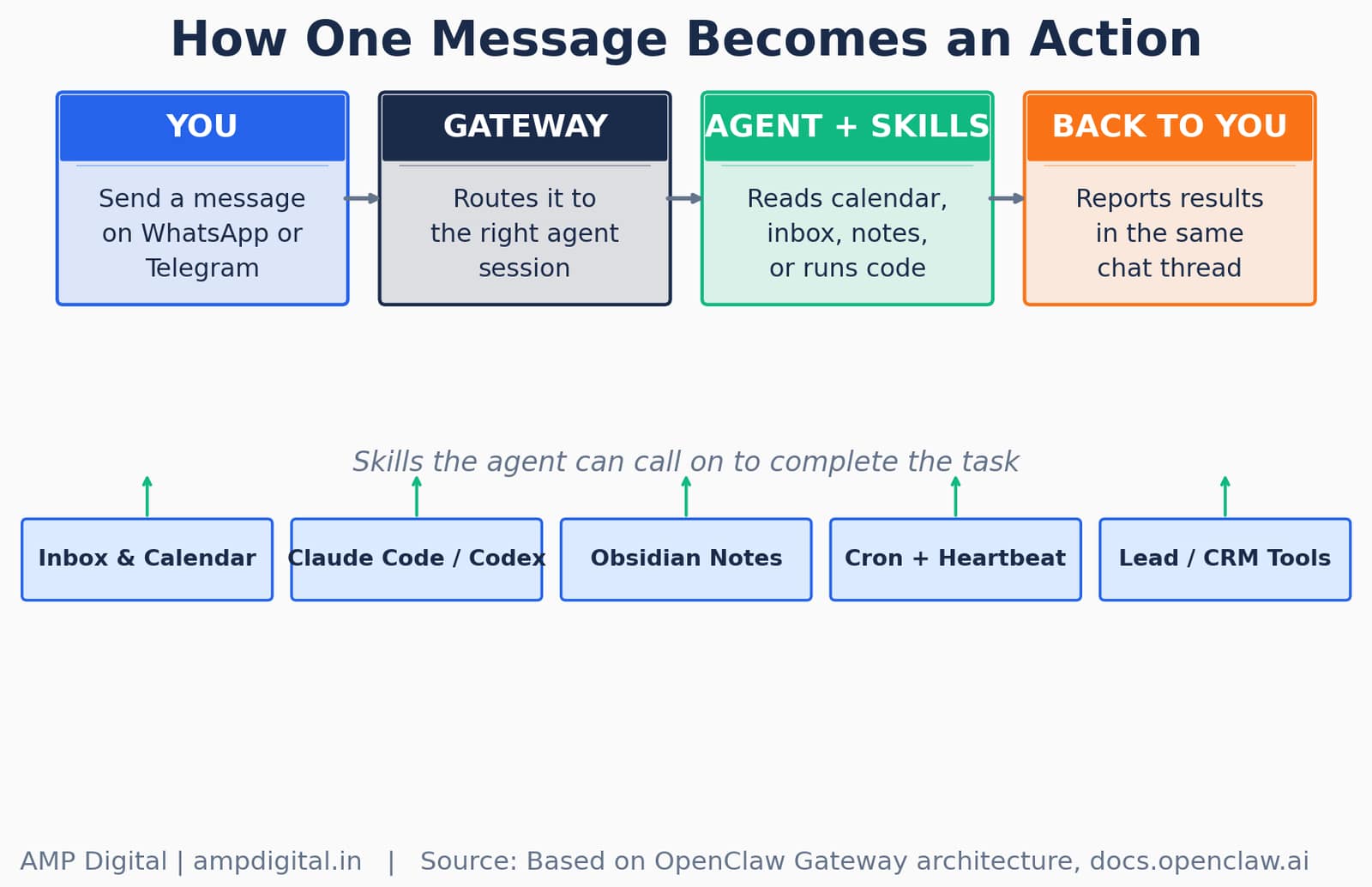
Figure 3. How a single message moves through the Gateway, the agent, and its skills.
Key Stat
About 23% of advanced OpenClaw users run file-writing skills like the Obsidian integration — described as the most powerful capability most people never bother to configure.
Example 4: Background Monitoring
Direct answer: because OpenClaw supports cron jobs and a "heartbeat," it can proactively check things — flight status, a webhook, a metric — and message you only when something is worth knowing.
The heartbeat is what separates OpenClaw from a chatbot that only reacts when you type. It wakes on a configurable schedule (every 30 minutes by default) and follows instructions you leave it in a file called HEARTBEAT.md. If that file is empty, OpenClaw skips the run to save API calls; if it has instructions, the agent decides what to check and whether anything is worth telling you.
What people monitor | How the heartbeat is configured | When it messages you |
Flight prices | Check a flight-price API every morning | Only if the price drops below a threshold |
Sentry error logs | Poll the webhook on each heartbeat cycle | When a new production error appears |
Overnight Slack activity | Summarize unread channels before 8am | One daily digest, not a running feed |
A business metric | Query a dashboard or API on a schedule | Only on a meaningful change, not every check |
"Apparently @openclaw checks in during heartbeats!? A kinda awesome surprise! Love the proactive reaching out."
— @HixVAC, OpenClaw user testimonial, 2026
Warning
Heartbeats consume API calls even when nothing happens. If you are on a metered model plan, start with heartbeat.every set to a longer interval, or disable it entirely until you have a clear list of what you actually want checked.
Example 5: Small Business and Freelance Automation
Direct answer: freelancers use OpenClaw for lead research, website audits, and CRM updates — tasks that used to take a virtual assistant.
Documented adoption among small businesses and freelancers centers on exactly this pattern: research-heavy, repetitive tasks that do not require a human’s judgment on every step, only a human’s review at the end. A freelancer might message OpenClaw with a list of ten prospect websites and ask for a quick audit of each one’s SEO basics, or ask it to scan a niche and build a shortlist of prospects that match a specific profile.
Where OpenClaw draws the line, by design:
- Yes, for research, qualification, and drafting: scanning sites, building shortlists, summarizing prospects, writing outreach or ad-copy drafts.
- For anything that actually sends — outreach messages, ad campaigns, CRM changes with financial impact — the recommended pattern is "let OpenClaw draft; you approve," not full autonomy.
Best Practice
Treat OpenClaw as a research and drafting assistant for client-facing work first. Add send-level autonomy only after you have reviewed enough of its drafts to trust the pattern it has learned.
A Grounding Example, in Plain Language
All five capabilities above become clearer when you see them working together instead of one at a time. Instead of opening five separate apps to plan your day, you send one message: "Check my calendar, draft replies to anything urgent in my inbox, and remind me at 3pm to call the client." OpenClaw coordinates across the connected tools and reports back in the same thread.
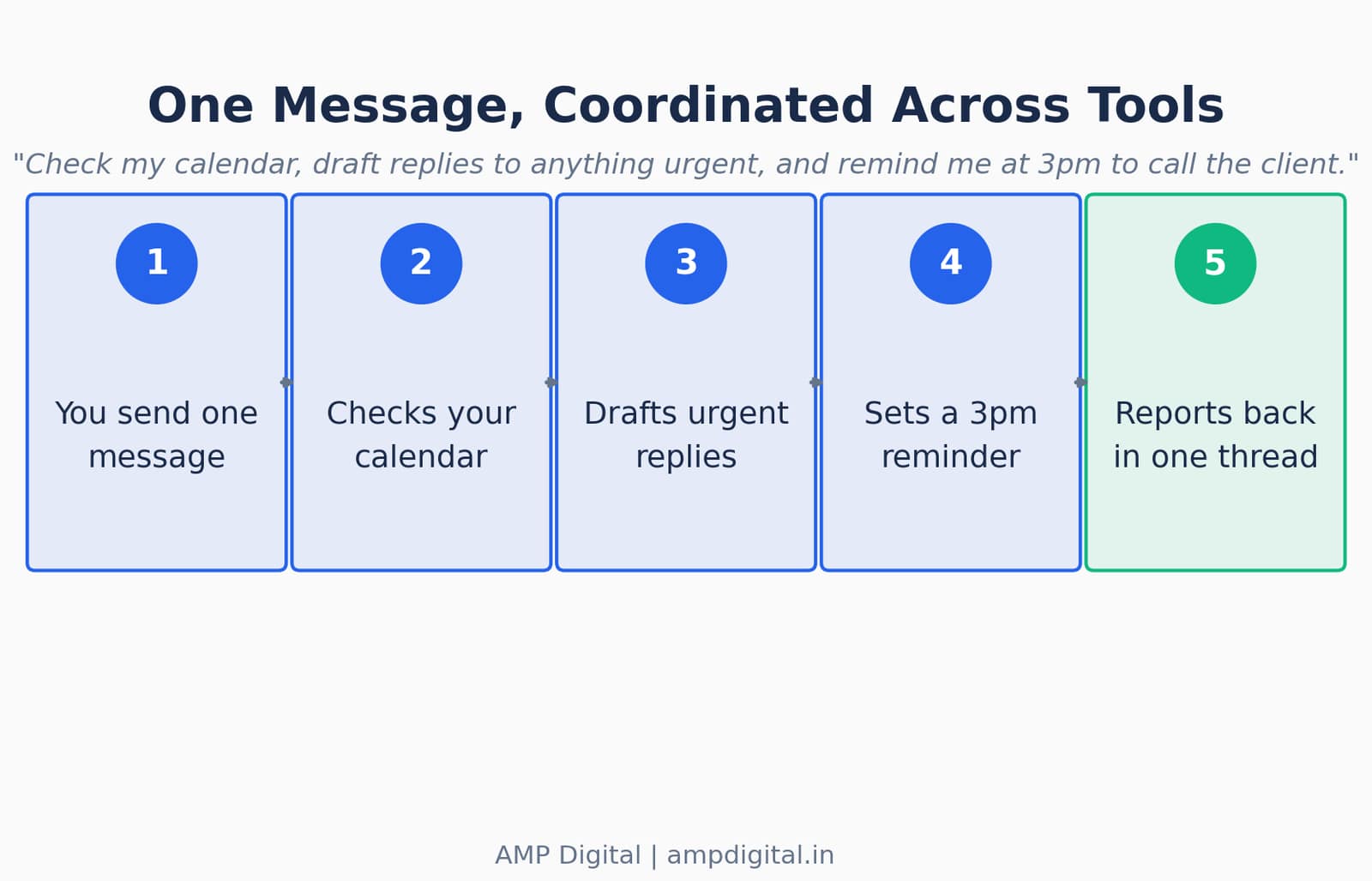
Figure 4. One message, five coordinated steps, one reply.
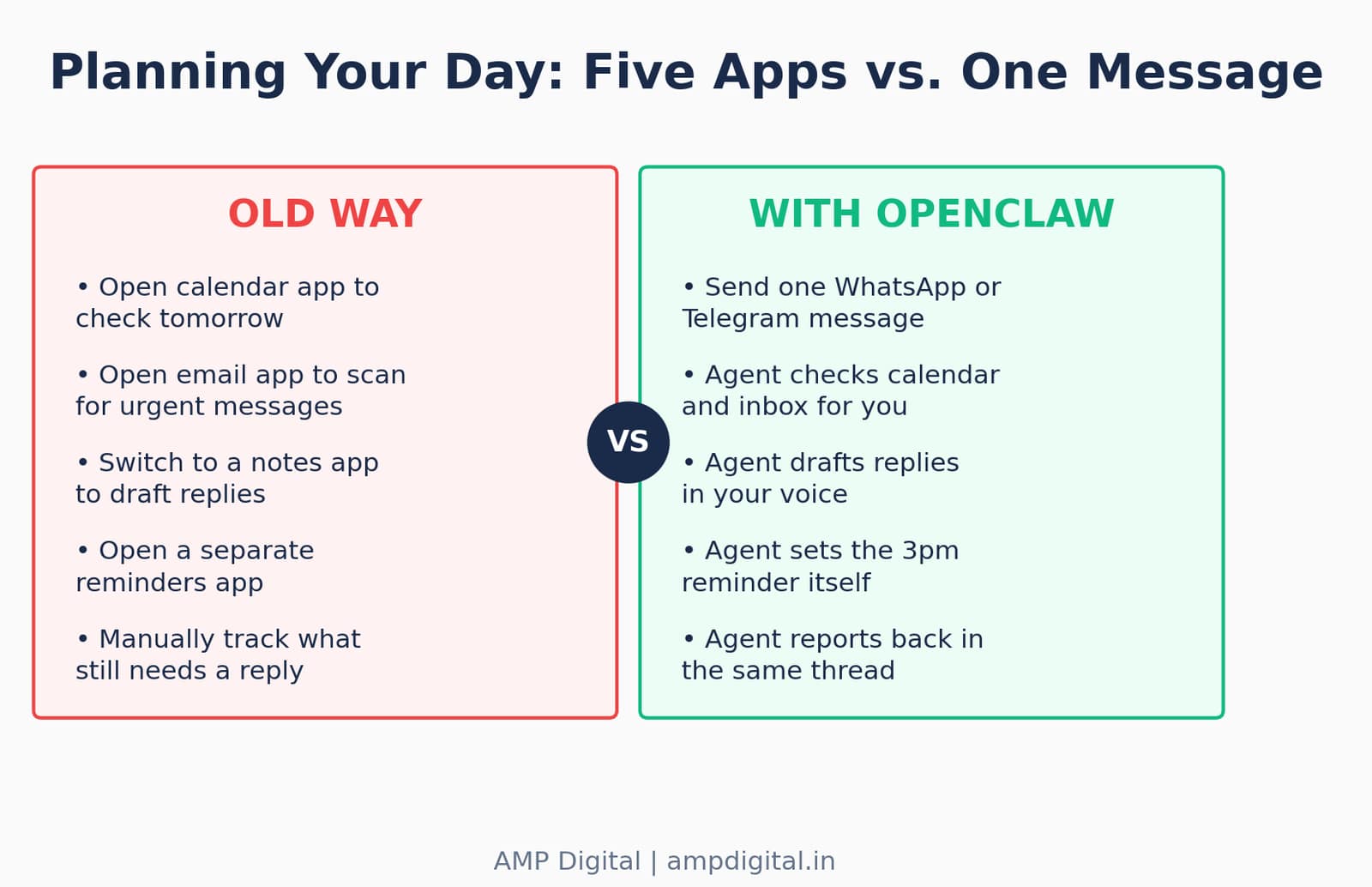
Figure 5. The old way required switching between five separate apps; OpenClaw compresses it into one message.
This is the actual value proposition, stated plainly: not that OpenClaw can do any single one of these tasks — plenty of tools can check a calendar or draft an email — but that it can chain several of them together from a single instruction and tell you only what changed, in the app you already have open.
Real-World Examples People Have Actually Shared
These are not hypothetical demos. Each row below is a documented, publicly shared example of someone using OpenClaw for a specific outcome.
User / Source | What they set it up to do | Outcome |
@BraydonCoyer (X, 2026) | Named the agent "Jarvis" for daily briefings and calendar checks | Reminds them when to leave for pickleball based on live traffic |
@conradsagewiz (X, 2026) | Connected OpenClaw to Codex CLI via Telegram | Drafted detailed spec files while out on a walk with the dog |
Documented case, MindStudio (2026) | Ran six OpenClaw agents as "employees" coordinating via a shared Telegram group | PA, growth agent, job scout, security monitor, and builder running in parallel |
Ron Forbes, personal blog (2026) | Connected an Obsidian second brain to a daily walk-and-talk routine | Morning briefings pull directly from over 2,000 personal notes |
"Since you are enjoying it, also try @openclaw — it is quite magical and pulls you in more and more as you use it."
— @The_Global_Soul, OpenClaw user testimonial, 2026
Reality Check: This Power Comes With Responsibility
This power comes with responsibility. OpenClaw can take real actions on real accounts — sending emails, deleting files, merging code, spending money — so it is worth understanding what it is doing before giving it broad access. This is not a hypothetical caution. Security researchers found over 135,000 exposed OpenClaw instances across 82 countries, more than 50,000 of them directly vulnerable to remote code execution, and one widely reported incident involved an agent deleting an entire email account by accident.
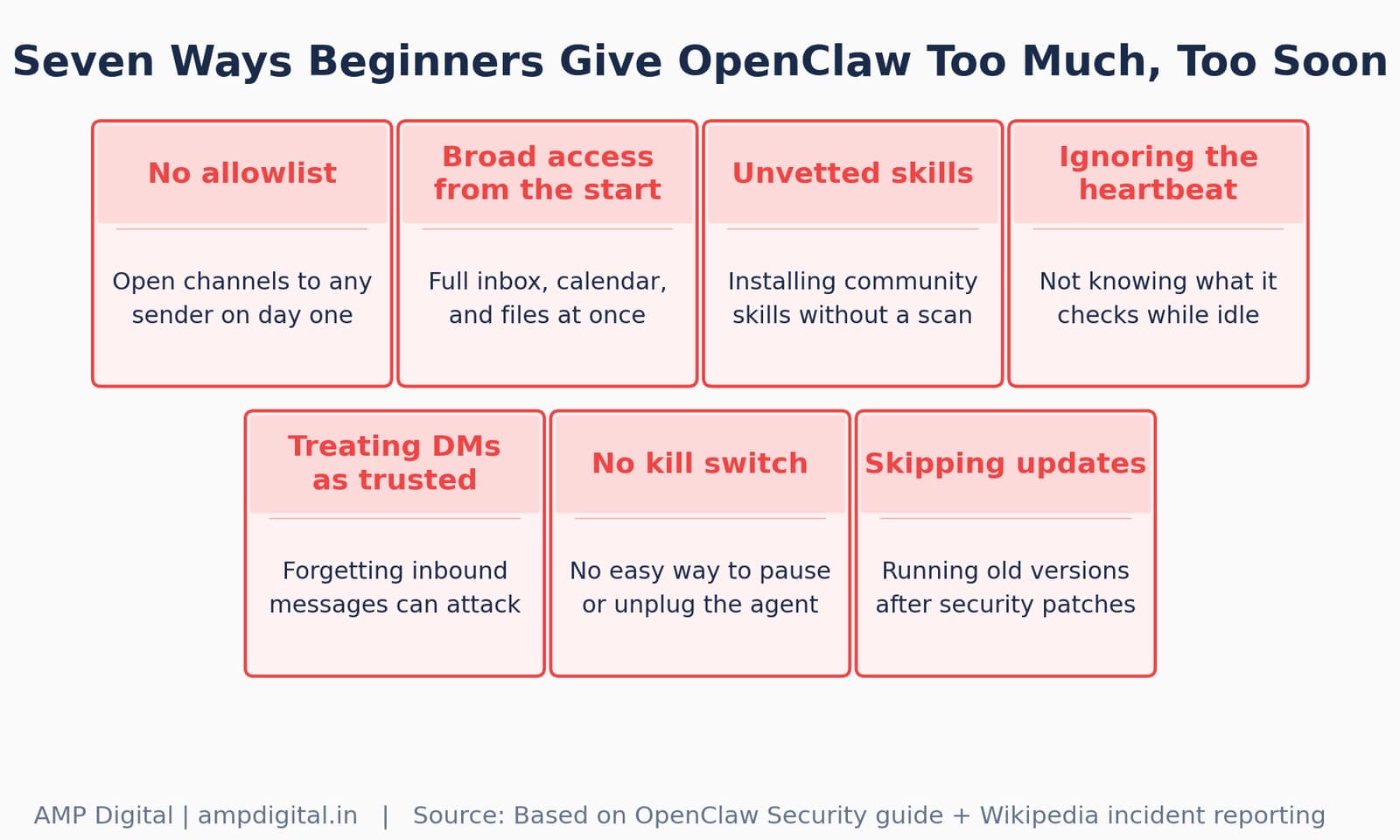
Figure 6. The mistakes that most often turn a helpful agent into a liability.
Risk | Why it matters | Simple mitigation |
Prompt injection | Inbound messages can contain hidden instructions the agent may treat as legitimate | Treat all inbound DMs as untrusted input, as OpenClaw’s own docs recommend |
Unvetted community skills | Cisco’s AI security team found a third-party skill performing silent data exfiltration | Only install skills that have been scanned or come from a trusted source |
Over-broad permissions | A misconfigured agent can access email, calendar, and files all at once | Start with an allowlist and read-only access; expand gradually |
No kill switch | An always-on agent with shell access needs a way to be stopped immediately | Run it on a device you can physically unplug while you are learning |
"If you can’t understand how to run a command line, this is far too dangerous of a project for you to use safely."
— Shadow, OpenClaw maintainer, via Discord (2026)
Warning
This is not a reason to avoid OpenClaw — it is a reason to sequence your setup carefully. More on that, plus the exact guardrails every beginner should put in place first, is in Part 3.
Where This Is Heading
Analyst coverage points the same direction the numbers do: Gartner predicts 40% of large enterprises will deploy autonomous AI agents by the end of 2026, and OpenClaw is already the default open-source option for a large share of those pilots. What started as a personal convenience — clearing an inbox from a phone — is becoming the reference architecture for how individuals and small teams delegate real work to an always-on agent.
The direction of travel is toward more permission granularity, not less caution: OpenClaw’s own 2026 security hardening update made skills fail closed by default when they lack proper permission declarations, and enterprise-ready guardrails with human-in-the-loop review are rolling out as an opt-in feature. The tools are getting more capable and, in parallel, more careful about how that capability is granted.
Update
As of mid-2026, OpenClaw sits at 378,000+ GitHub stars, 3.2 million monthly active users, and 44,000+ community skills — and continues shipping roughly one release every two days.
The Numbers Behind the Hype
Two more data points are worth seeing rather than just reading. First, how the growth actually happened over time — not a smooth climb, but a single day that changed everything.
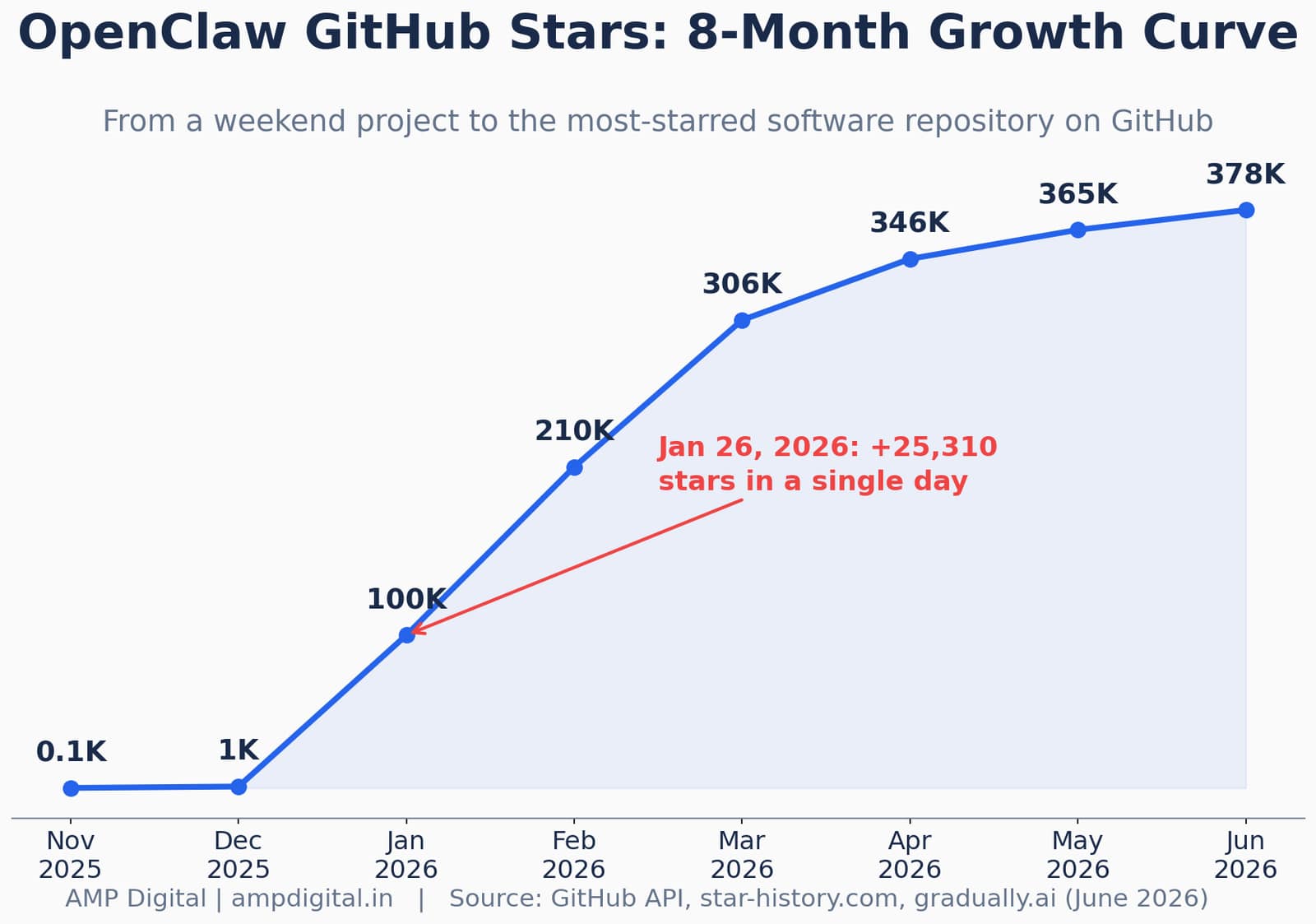
Figure 7. A single day — January 26, 2026 — accounts for a disproportionate share of the growth curve.
Second, what people are actually satisfied with once the novelty wears off, and what share of real use cases fall into the "productivity" bucket these five examples represent.
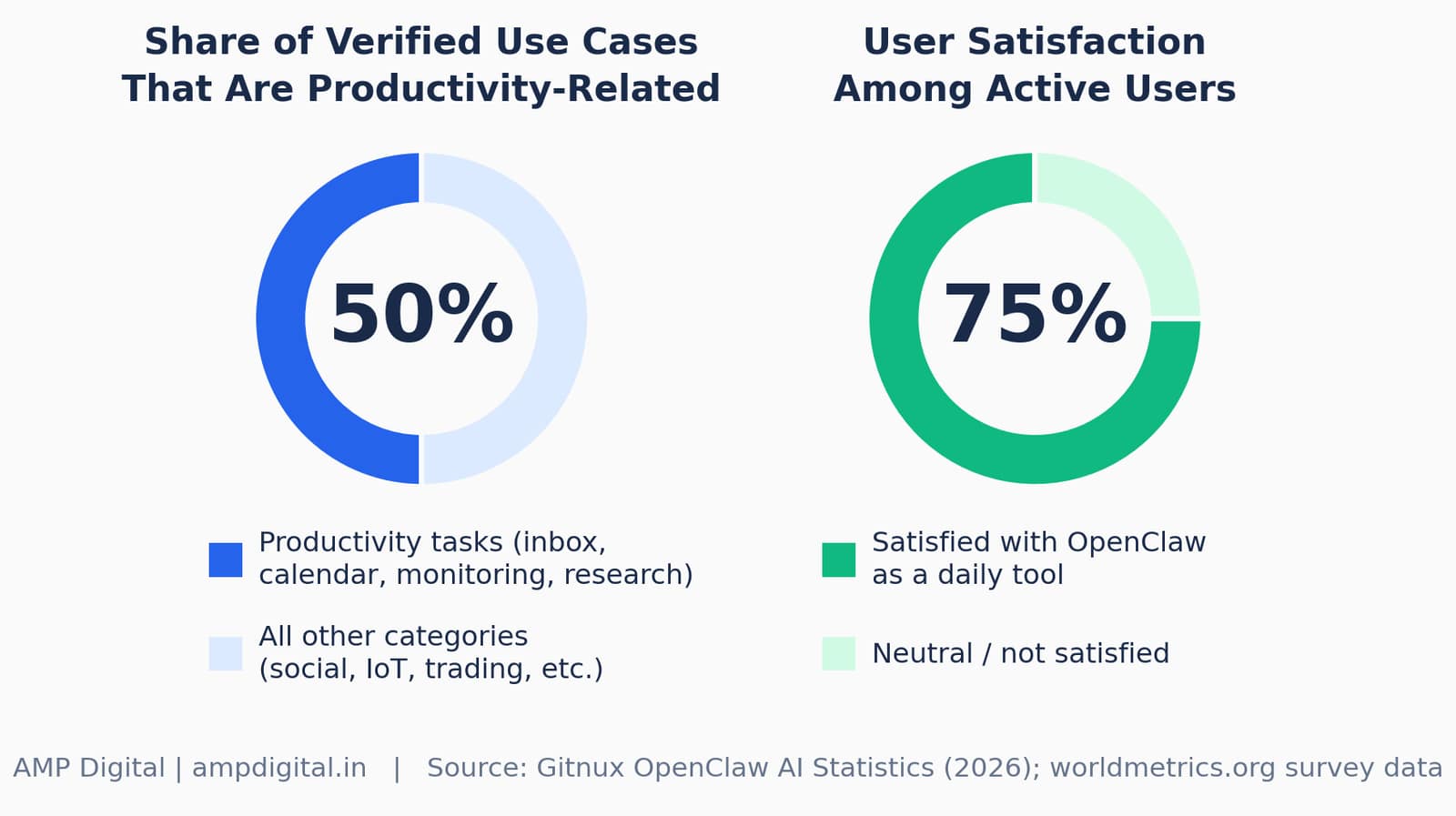
Figure 8. Half of verified use cases are productivity tasks, and three in four active users report satisfaction.
Getting the Access Level Right
The five examples above range from low-risk (checking a calendar) to meaningfully consequential (merging code, spending money, sending client emails). The responsible way to adopt OpenClaw is to climb this ladder deliberately rather than granting everything on day one.
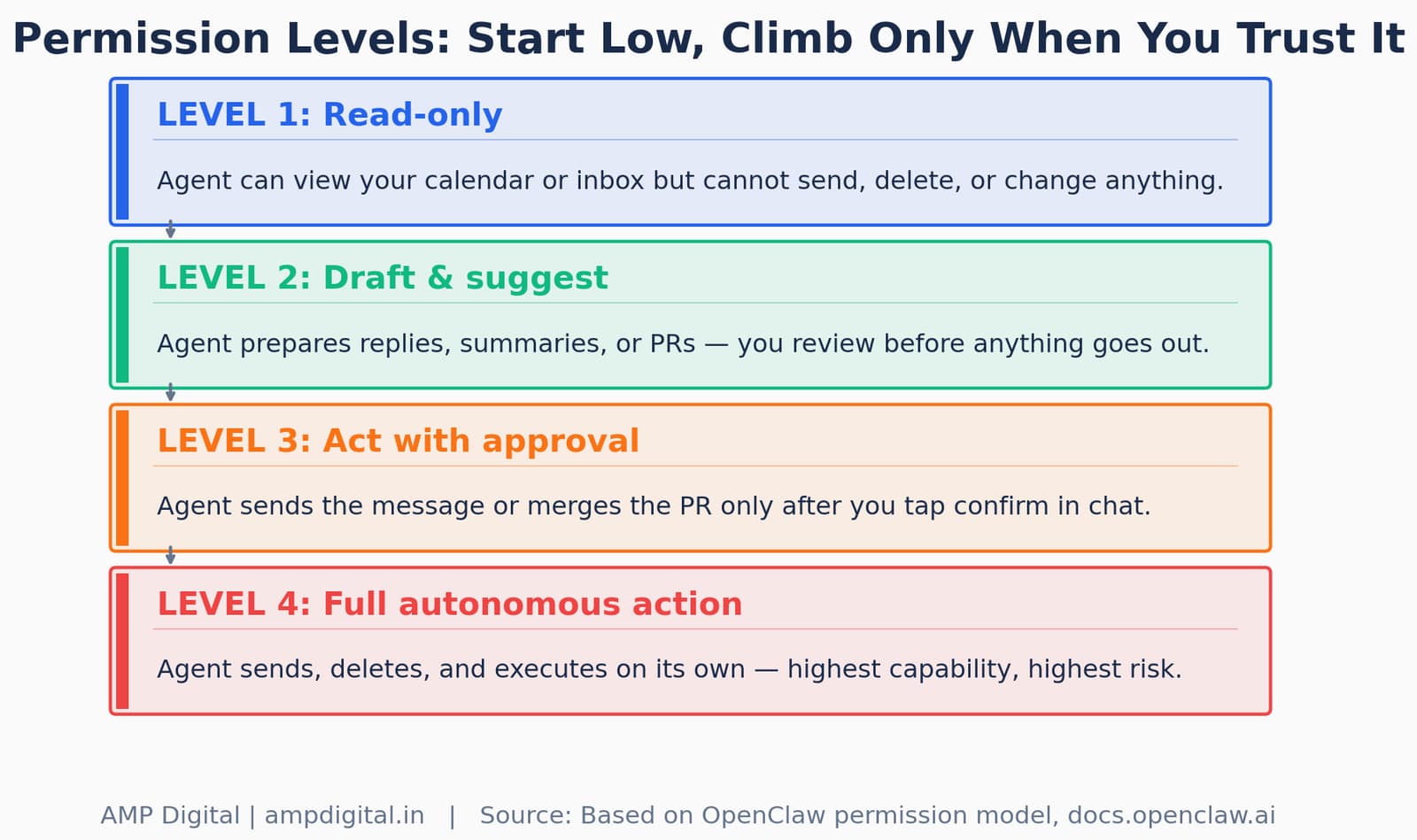
Figure 9. Start at Level 1 and only move up once you trust the pattern.
And the time savings compound quickly once even the simplest tasks are compressed into a single message instead of a sequence of app switches.
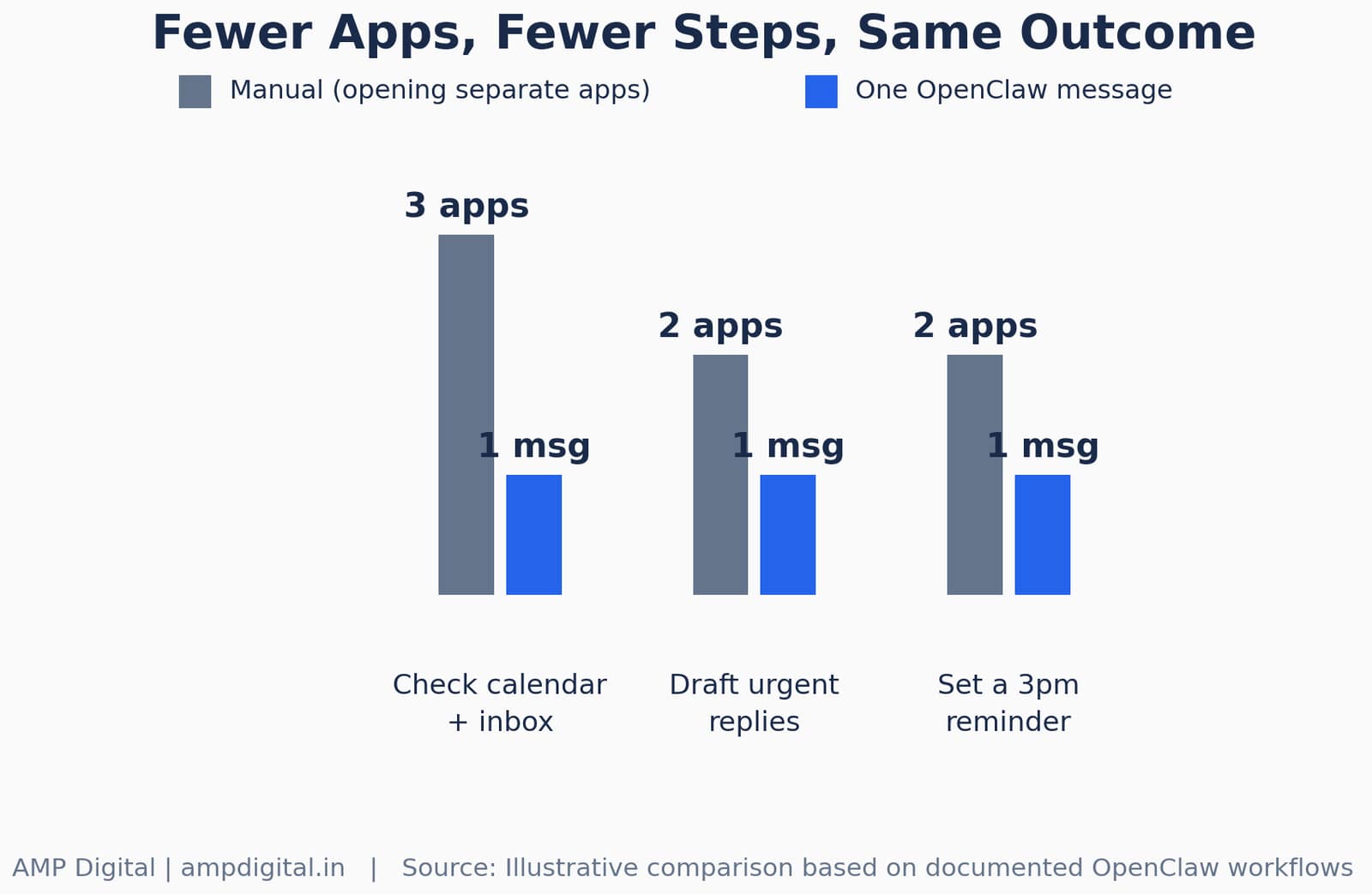
Figure 10. Fewer apps, fewer steps, same outcome — illustrative comparison based on documented workflows.
Frequently Asked Questions
Do I need to know how to code to use OpenClaw?
No. Basic setup uses a guided onboarding wizard (openclaw onboard) and works entirely through chat once a channel like Telegram is connected. That said, one of OpenClaw’s own maintainers has warned that comfort with a command line is a reasonable baseline before granting it broad access, since deeper customization and safer configuration both benefit from it.
Which messaging app should a beginner start with?
Telegram is the most commonly recommended starting channel. It is faster to set up than WhatsApp and more stable for production use, since WhatsApp connections are known to be fragile and often need re-authentication.
Can OpenClaw actually send emails and merge code on its own?
Yes, if you grant it that level of access — which is exactly why permission levels matter. By default, most setups start conservative: the agent drafts and suggests, and a human approves before anything is sent, merged, or deleted.
What is the "heartbeat" and do I have to use it?
The heartbeat is a scheduled check-in, roughly every 30 minutes by default, that lets OpenClaw act proactively instead of only responding when you message it. It is entirely optional: setting heartbeat.every to "0m" disables it, and if your instructions file is empty, OpenClaw skips the run automatically.
Is OpenClaw safe to connect to my personal email and calendar?
It can be, but safety depends entirely on how it is configured. Because OpenClaw can access sensitive services and is susceptible to prompt injection through inbound messages, the responsible approach is to start with an allowlist, use a dedicated device or account while learning, and treat all inbound DMs as untrusted input, exactly as the official documentation recommends.
How is OpenClaw different from just using Claude Code or ChatGPT?
Claude Code and Codex are built for the fastest direct coding loop inside a repository; OpenClaw is a coordination and memory layer that sits above them, reachable from your phone, with persistent memory and the ability to orchestrate several tools — email, calendar, notes, code — from one instruction. Think of Claude Code as the specialist and OpenClaw as the coordinator who calls the specialist in when needed.
What happens if OpenClaw makes a mistake with broad access?
Because it is local-first and self-hosted, a misconfigured agent can do real damage — there are documented cases of accidental email deletion. This is precisely why the permission-ladder approach (read-only, then draft-and-suggest, then act-with-approval, then full autonomy) matters more than any single feature.
Conclusion
"AI assistant" stops being abstract the moment you see it clear a real inbox, open a real pull request, or catch a real flight-price drop while you are doing something else entirely. The five examples here — inbox and calendar management, dev workflow automation, second-brain research, background monitoring, and freelance task automation — are not edge cases. They are the most common, most documented ways people are actually using OpenClaw today, and every one of them starts with a single plain-language message.
None of that changes the fact that OpenClaw can take real actions on real accounts. The same flexibility that lets it coordinate five tools from one message is the flexibility that makes broad, ungoverned access risky. Curious how to actually set this up safely? Part 3 covers getting started plus the guardrails every beginner should put in place first.
Summary
Before you connect OpenClaw to anything sensitive:
1. Pick one channel to start (Telegram is the easiest).
2. Start at Level 1 (read-only) access and climb deliberately.
3. Set an allowlist — never leave a channel open to any sender.
4. Only install skills that are vetted or come from a trusted source.
5. Know how to physically stop the agent before you grant it broad access.
6. Read Part 3 before connecting email, calendar, or payment tools.
References
- OpenClaw. "OpenClaw — Personal AI Assistant." openclaw.ai, accessed June 2026.
- OpenClaw GitHub Repository. github.com/openclaw/openclaw, accessed June 2026.
- Wikipedia. "OpenClaw." en.wikipedia.org/wiki/OpenClaw, updated May 2026.
- OpenClaw Documentation. "FAQ" and "Personal Assistant Setup." docs.openclaw.ai, updated April–May 2026.
- MindStudio. "What Is OpenClaw? The Open-Source AI Agent That Actually Does Things." mindstudio.ai/blog, February 2026.
- Emergent. "What is OpenClaw? Complete Guide to the Open-Source AI Agent (2026)." emergent.sh/learn, 2026.
- Milvus Blog. "What Is OpenClaw? Complete Guide to the Open-Source AI Agent." milvus.io/blog, February 2026.
- The New Stack. "OpenClaw Rocks to GitHub’s Most-Starred Status, But Is It Safe?" thenewstack.io, March 3, 2026.
- OpenClawVPS.io. "OpenClaw Statistics 2026: Growth, Users, and Ecosystem Data." Updated April 3, 2026.
- Gradually.ai. "OpenClaw Statistics 2026: Key Numbers, Data & Facts." Updated June 2026.
- GetPanto.ai. "OpenClaw Statistics 2026: Users, Growth, Revenue & Adoption." Updated May 28, 2026.
- Gitnux. "Openclaw AI Statistics." gitnux.org/openclaw-ai-statistics, February 24, 2026.
- OpenClaw.report. "200,000 Stars on GitHub." openclaw.report/news, 2026.
- Easton Blog. "Building Your Second Brain: OpenClaw & Obsidian/Notion Deep Memory Sync Guide." February 27, 2026.
- Bright Data. "Build a WhatsApp AI Assistant with OpenClaw & Bright Data." brightdata.com/blog/ai, March 30, 2026.
- 36Kr. "15 OpenClaw Application Cases: Which Ones Will Be Truly Effective in 2026?" eu.36kr.com, April 26, 2026.
- GitHub. "goldmar/openclaw-code-agent." Plugin documentation, accessed June 2026.