

The real reason OpenClaw keeps getting more capable every week — and how to build a skill of your own
This is Post 4 in AMP Digital's OpenClaw series. If you're new here, Post 1 covered what OpenClaw is and why people are running it as a personal AI agent, Post 2 walked through real use cases, and Post 3 got you through setup and the safety basics. This post answers the question that comes up right after setup: why does someone else's OpenClaw feel completely different from yours, even though you're both running the same model underneath?
Introduction
The real reason OpenClaw keeps getting more capable every week isn't a bigger model update. It's skills. Every time a large language model provider ships a new flagship, OpenClaw users notice a bump — but the bigger jumps, the ones that make an agent feel like it truly belongs to you, come from something much smaller: a folder with a SKILL.md file inside it.
Here's the problem skills solve. Ask an AI agent to check your sleep data against your training goal and flag anything off, and it will do a competent job — once. Ask it again tomorrow and you're re-explaining the same steps, hoping it remembers the nuance from last time. Multiply that across every recurring task in your life or business, and you're spending more time prompting than the task itself would take manually.
OpenClaw skills fix this by turning a one-off explanation into a permanent, reusable playbook. This piece explains exactly what a skill is, where skills live and why that location matters, how to build your first one even with zero coding background, and — because this ecosystem has already had real security incidents — what to watch for before you install someone else's.
"If the agent writes a bad answer, you can ignore one answer. If the agent writes a bad skill, that mistake can become part of how future work is done."
— OpenClaw Blog, Skill Workshop announcement, 2026
By the end of this article you'll know what separates a skill from a script, why the folder it lives in changes how it behaves, how OpenClaw can now draft skills for itself through a governed review process, and the specific mistakes that have let attackers turn other people's skills against them.
What Is an OpenClaw Skill
An OpenClaw skill is a small folder containing a SKILL.md file — plain-language instructions, plus optional supporting files, that teach the agent how and when to handle one specific task. You do not need deep coding knowledge to use one. A bit of comfort with text files is enough to write one yourself.
Think of a skill as a recipe card, not a new brain. The underlying AI model is still doing all of the actual thinking — the skill just hands it a reliable, repeatable playbook for one job, so it doesn't have to reinvent the approach, or get it wrong, every single time it's asked.
Structurally, a skill is nothing exotic. It's a directory containing a SKILL.md file with YAML frontmatter at the top (metadata: a name and a one-line description) and a markdown body underneath (the actual instructions). Support files — scripts, reference docs, templates, example outputs — sit alongside it in standard subfolders. OpenClaw discovers a skill wherever a SKILL.md file appears under a configured skills root, up to six folder levels deep.
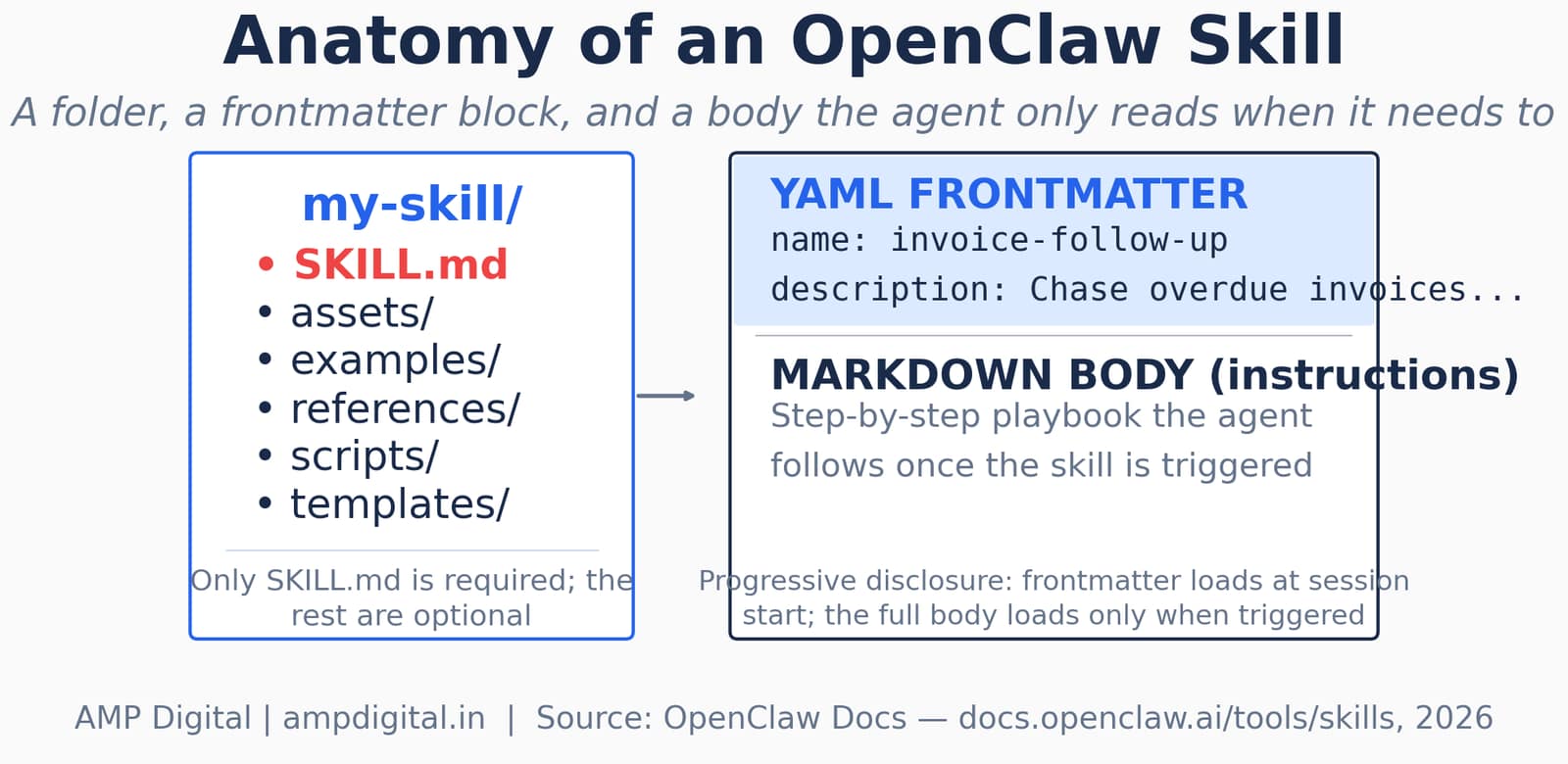
Figure 1. A skill is a folder with one required file (SKILL.md) and optional support subfolders. Only the frontmatter loads at session start; the full body loads when the skill is triggered.
That last detail — only the frontmatter loading up front — is called progressive disclosure, and it's why OpenClaw can have dozens of skills available without bloating every single conversation with instructions it isn't using yet.
The 3-Layer Breakdown
Layer | What It Contains | When It Loads |
YAML frontmatter | name + one-line description (metadata only) | Every session start, for every eligible skill |
Markdown body | Step-by-step instructions in plain language | Only when the skill is actually triggered |
Support files | Scripts, references, templates, examples | Only if the body instructs the agent to use them |
Key Stat
A skill is not just markdown — once applied, it changes future agent behavior. That is precisely why OpenClaw treats skill creation differently from normal file editing (see Section 5 on Skill Workshop).
Why Skills Matter More Than the Model
Model upgrades are impressive, but they're the same upgrade for everyone. Skills are not. A stranger's OpenClaw and yours will diverge fast once you've each built out skills around your own workflows — and that divergence, not the model card, is the actual moat. This is what turns a general-purpose assistant into your assistant.
It also explains why the ClawHub public skill registry grew so quickly, and why that growth created a genuinely serious security story worth understanding before you lean on it.
"researchers called it a single campaign behind the majority of malicious entries"
— Koi Security researchers, as reported by eSecurityPlanet, February 2026
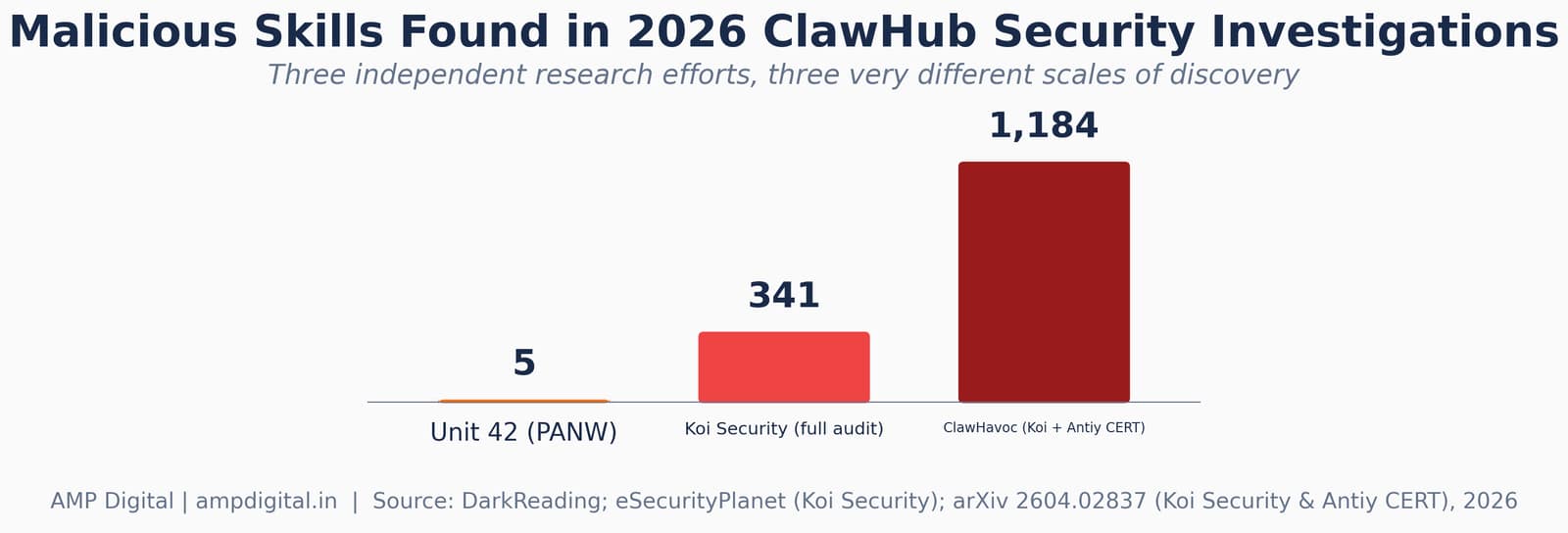
Figure 2. Three separate 2026 security investigations found malicious skills on ClawHub at very different scales — evidence this is an ongoing, not a one-time, problem.
Koi Security ran a comprehensive audit of every skill listed on ClawHub at the time — 2,857 in total — and identified 341 malicious entries, the large majority tracing back to a single coordinated campaign. Separately, an academic analysis of the broader incident, dubbed ClawHavoc by Koi Security and Antiy CERT, put the scale at 1,184 compromised skills, or roughly one in five packages in the ecosystem at the time of discovery. A Snyk audit cited in the same paper found that 36.8% of published skills carried at least one security flaw.
Investigation | Skills Found Malicious / Flawed | Scope Audited |
Unit 42 (Palo Alto Networks) | 5 skills bypassing security scans | Targeted follow-up review |
Koi Security | 341 malicious (11.9%) | 2,857 skills, full registry audit |
ClawHavoc campaign (Koi Security & Antiy CERT) | 1,184 malicious (~1 in 5) | Full ClawHub registry |
Snyk | 36.8% with ≥1 flaw | Published skills, registry-wide |
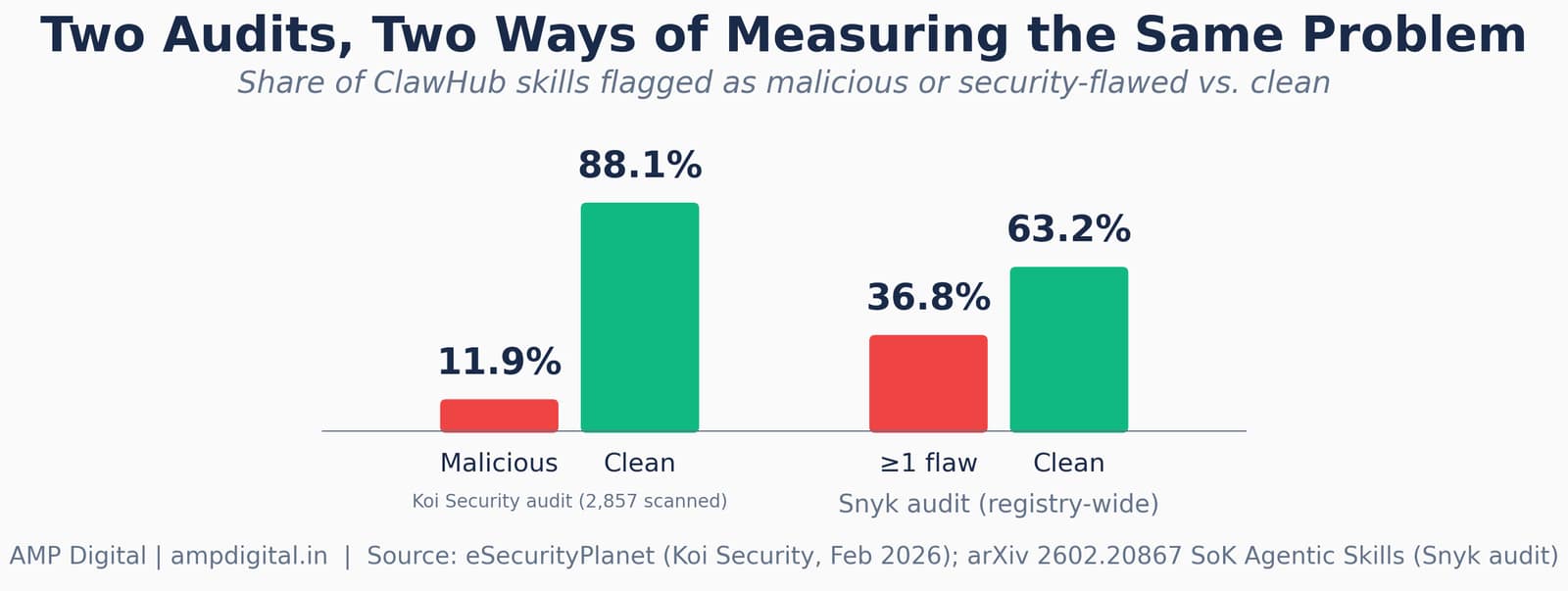
Figure 3. Two independent studies, two different measurement methods — both point to a double-digit share of the registry carrying real risk.
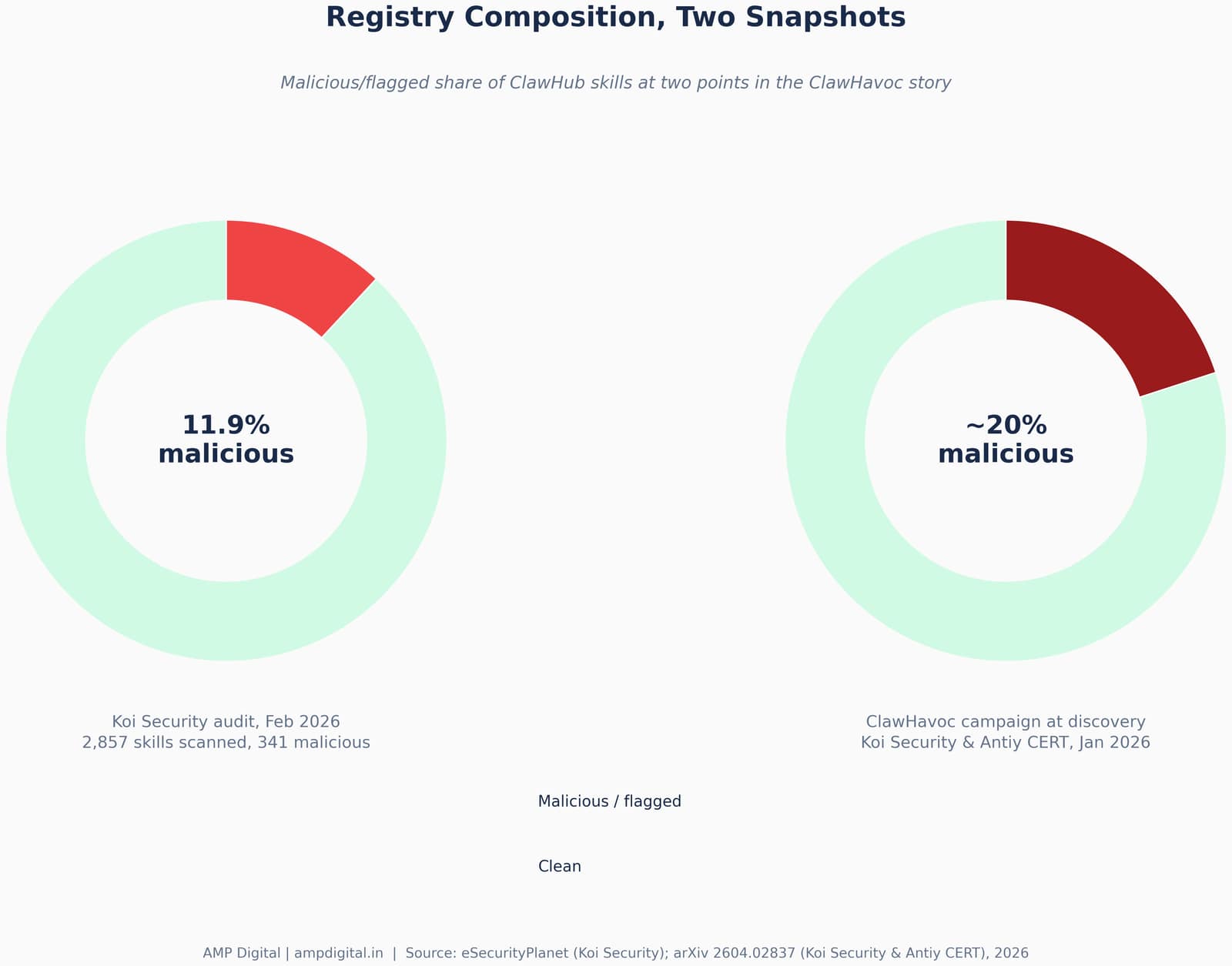
Figure 4. The same story from two moments in the ClawHavoc timeline — a full-registry audit vs. the campaign's peak share at the moment of discovery.
None of this means skills themselves are dangerous. It means the registry they're shared through needs the same scrutiny you'd give any package manager. Section 8 covers exactly how to vet a skill before installing it.
How to Build Your First Skill
You don't need a framework, a build step, or a repo. The beginner path is genuinely five steps, and the first version of your skill can be rough — it improves the same way good documentation does, through iteration.
- Pick one repetitive task. The best candidate is something you find yourself explaining to OpenClaw over and over, in almost the same words each time.
- Create a folder for it, and write a SKILL.md inside describing: what the task is, when to use it, and step-by-step how to do it — in plain language, no code required.
- Save it to your personal workspace skills folder. Workspace skills take the highest precedence, so this is the right default while you're iterating (see Section 4).
- Test it on a low-stakes version of the task first, before trusting it with something that matters.
- Refine the instructions based on what it gets wrong. Treat the first draft as a draft, not a finished product.
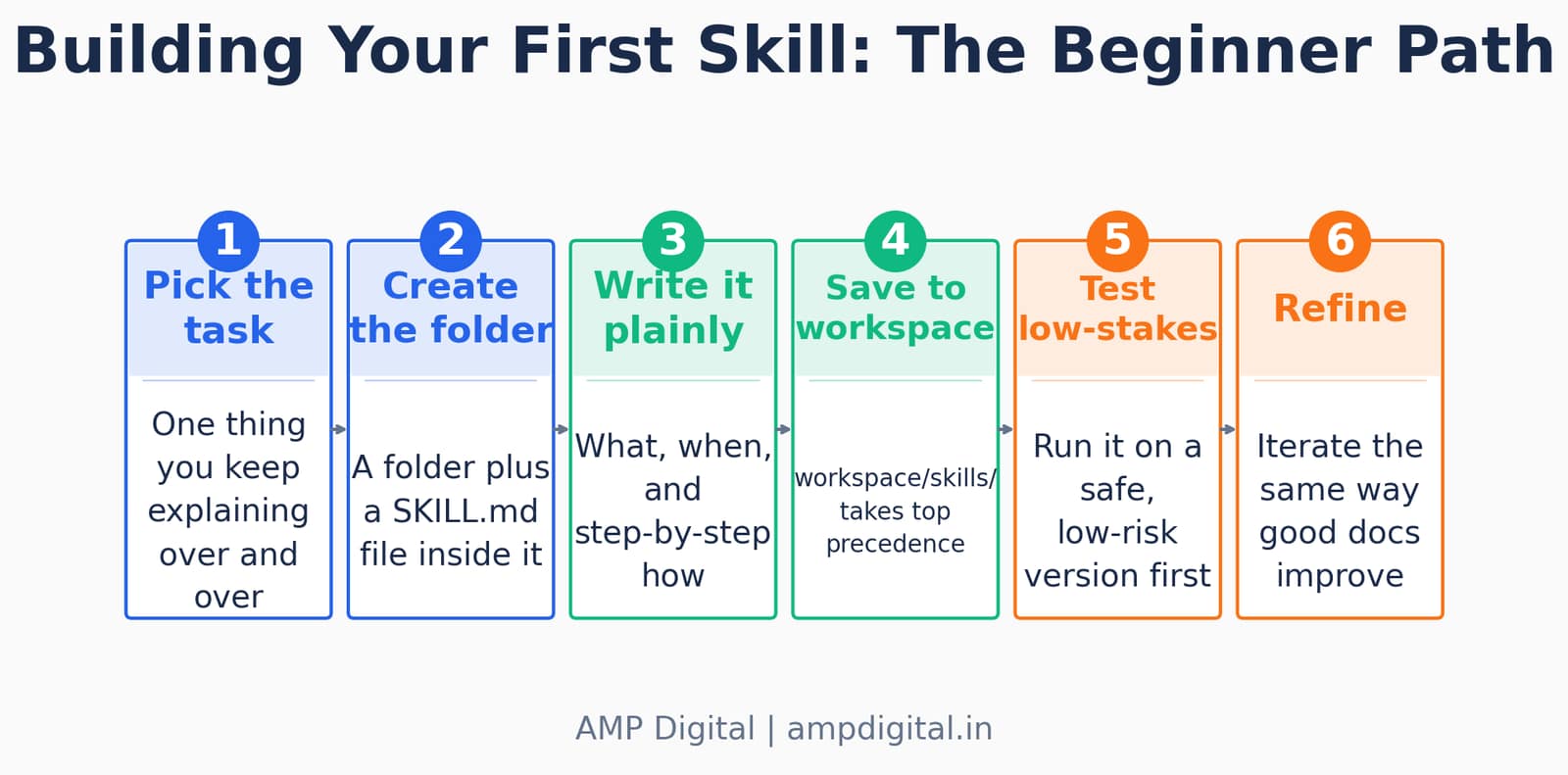
Figure 5. The beginner path from "task I keep explaining" to a working skill — five steps, no code required.
Pro Tip
Keep the SKILL.md description to one line and under 160 characters. That description is what the agent reads to decide whether the skill applies — vague descriptions are the single most common reason a skill silently never gets triggered.
Here's what that looks like in plain language, using the example from our earlier posts: instead of explaining, every single time, "check my WHOOP data, compare it to my sleep goal, and flag anything off," you write that once as a skill. From then on, you just say "run my WHOOP check" and it follows the same steps consistently.
Where Skills Live and How Precedence Works
Skills load from several places, in a defined order, and the location you choose changes both who can use the skill and what happens when two skills share a name.
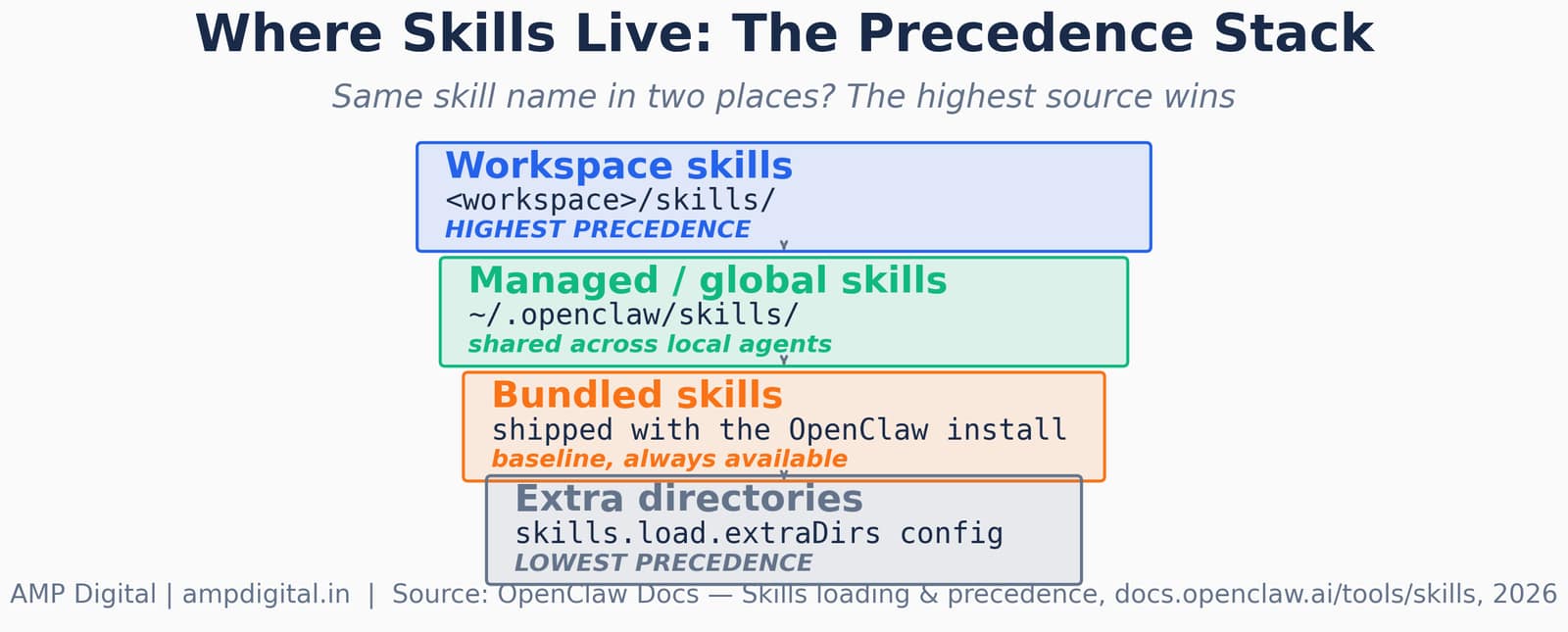
Figure 6. When the same skill name exists in more than one root, the highest-precedence source wins.
Source | Typical Path | Visibility |
Workspace skills | <workspace>/skills/ | This agent only — highest precedence |
Managed / global skills | ~/.openclaw/skills/ | Every local agent on the machine |
Bundled skills | Shipped with the install | Always available as a baseline |
Extra directories | skills.load.extraDirs config | Shared pack, lowest precedence |
"attackers are using AI agents as a trusted intermediary"
— Trend Micro, on malware disguised as OpenClaw skill instructions, 2026
This precedence system exists for a practical reason: it lets you override a bundled or shared skill with your own personal version without touching the original file. If your workspace has a skill named "research" and the global folder also has one, your workspace version runs. By default, OpenClaw also watches skill folders and picks up SKILL.md changes on the next new session — you don't need to restart the whole gateway to pick up an edit.
Letting OpenClaw Write Its Own Skills
The genuinely wild part of this feature: you don't always have to write the SKILL.md file yourself. You can describe the task in chat, or even hand the agent a reference like a tutorial, and ask it to draft the skill for itself. OpenClaw calls this governed path Skill Workshop, and it's built specifically so a bad first draft doesn't quietly become permanent behavior.
- The agent never writes directly to a live SKILL.md through this path. It creates a proposal first — a pending draft, stored as PROPOSAL.md, not SKILL.md.
- You review it, ask for changes ("add the VIP sender rule," "make the dry-run step clearer"), and the agent revises the same proposal rather than starting over.
- Nothing changes how the agent behaves in future sessions until you explicitly apply it.
- Once applied, unused skills are curated automatically — a skill unused for 30 days is marked stale, and after 90 days it's archived out of new sessions, though using it again brings it back on the next sweep.
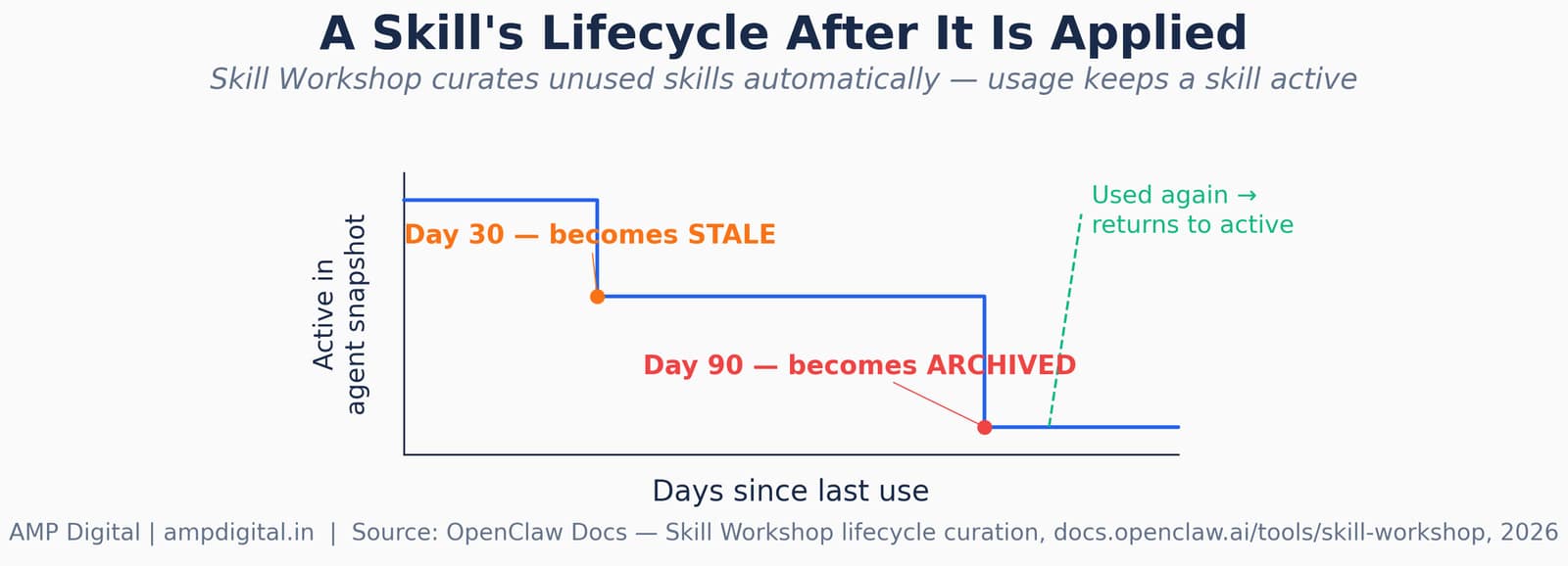
Figure 7. Skill Workshop curates unused skills over time — usage is what keeps a skill in the active set.
Key Stat
A documented example: a user tells their agent, mid-conversation, "remember to convert all USD figures to PKR using today's rate when I send you any financial document." Skill Workshop's heuristic detector picks up the correction and drafts a proposal — reviewed and applied in minutes, with no manual file creation required.
Some users have reported this going further still — the agent editing its own configuration and picking up the change mid-session as it learns, without a full restart. That's the direction this feature is heading: an assistant that compounds in value the longer you use it, instead of staying a static novelty.
Tools and Frameworks for Working With Skills
There's more than one way to get a skill into your workspace, and each path trades off speed against review and safety.
Method | Best For | Review Step |
Hand-written SKILL.md | Full control, sensitive workflows | You write and test it yourself |
Skill Workshop (/learn) | Turning a chat correction into a reusable skill | Proposal → your approval → apply |
ClawHub install | Common, already-solved tasks | Security-scan status shown before install |
skills.sh (cross-runtime registry) | Skills meant to run outside OpenClaw too | Varies by publisher |
For anything touching a sensitive account — email, banking, credentials — the hand-written or Skill Workshop paths are the safer default, precisely because you control every line before it becomes active.
Common Mistakes
Most skill problems trace back to a small, repeatable set of mistakes — not to the concept itself.
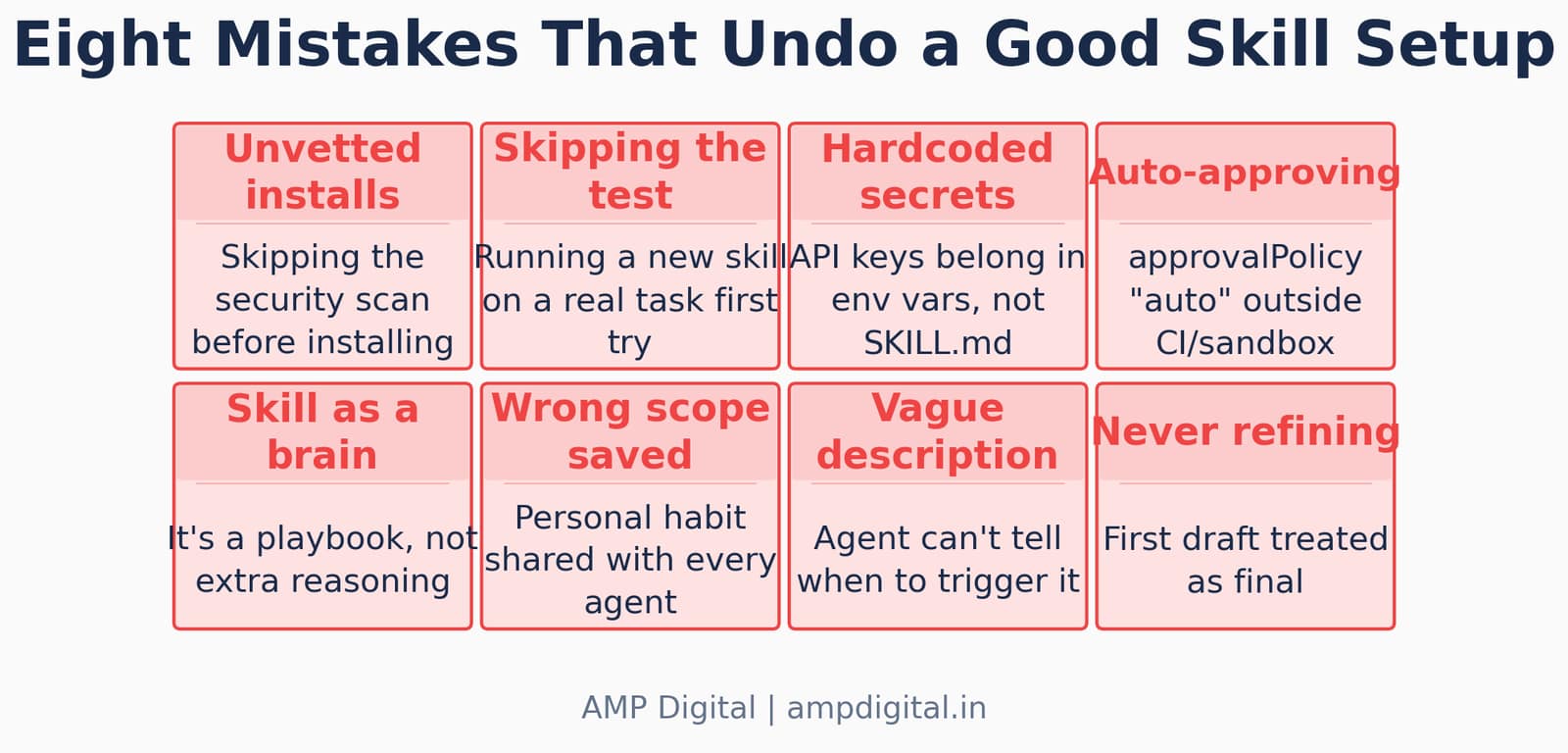
Figure 8. Eight patterns that quietly undo an otherwise well-built skill setup.
Warning
Skills aren't automatically vetted. There's a growing public library on ClawHub, but installing someone else's skill means trusting code or instructions you didn't write. Security researchers have already found third-party skills that quietly exfiltrated data — one campaign alone compromised over a thousand listings before it was caught.
Mistake | Why It Bites You |
Installing without checking scan status | ClawHub shows a security-analysis result per skill — skipping it is skipping the one free check you get |
Auto-approving Skill Workshop proposals | Outside CI or a sandbox, a human review step is the entire point of the workflow |
Saving a personal habit to the global folder | Managed/global skills are visible to every local agent, not just the one you meant it for |
Hardcoding API keys in the SKILL.md body | Secrets belong in environment variables, scoped to the host agent run, not in plain text |
"gaming the platform's ranking system"
— Silverfort research team, describing a ClawHub vulnerability that could push a malicious skill to the top spot
Advanced Practices and Vetting Before You Install
Once the basics are working, the discipline that separates a reliable skill setup from a risky one is almost entirely about vetting and scope discipline.
Best Practice
Before installing any ClawHub skill: check that it shows a clean security-scan result, verify the publisher has real, dated activity rather than an account created hours ago, and confirm the permissions it requests actually match what it claims to do. If any of those three checks fails, skip it.
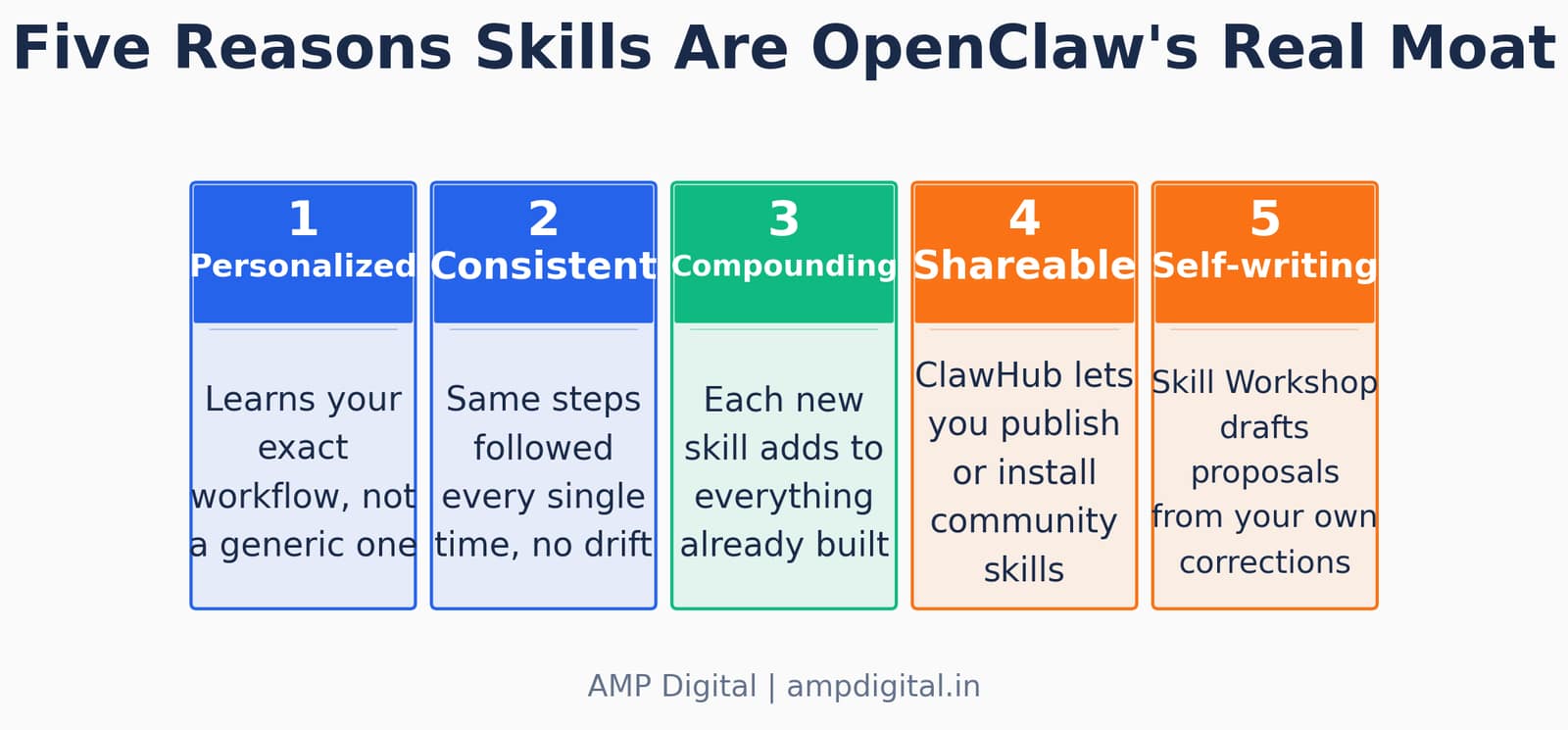
Figure 9. The compounding advantage of a well-maintained skill set, in five parts.
Prefer well-known, reviewed skills for anything touching sensitive accounts, or write your own. OpenClaw's own maintainers have been direct about this trade-off: automated scanning (the platform now partners with VirusTotal, rescanning daily) catches a lot, but deeply hidden prompt injection payloads can still slip through. Scanning is a floor, not a guarantee.
Real-World Examples
Three examples show the range, from a personal convenience skill to an official workflow to a cautionary tale.
Example | What Happened | Takeaway |
WHOOP sleep check (personal) | A recurring "compare my data to my goal" explanation turned into a one-phrase skill | Smallest, most personal automations are often the best first skill |
"morning-catchup" (OpenClaw docs) | A daily inbox-triage routine drafted through /learn, revised once, then applied | The propose → revise → apply loop works for genuinely daily workflows |
ClawHavoc campaign (ClawHub) | Typosquatted, professionally documented skills distributed credential-stealing malware | Polish and a plausible name are not evidence of safety |
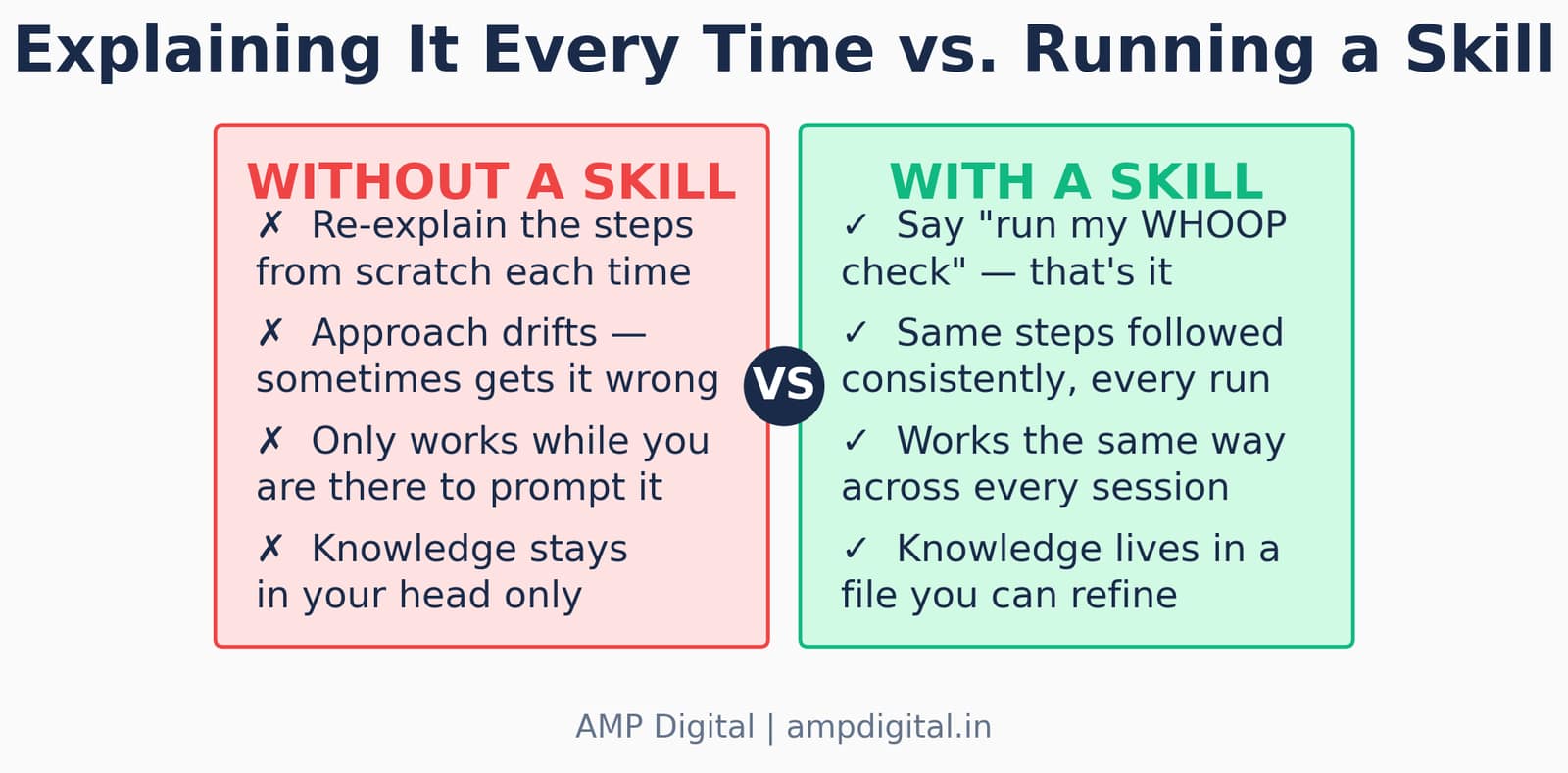
Figure 10. The before/after this whole feature is built around — explained once vs. run consistently.
"the agent picks it up immediately, no restart required"
— Blink Blog, describing a Skill Workshop proposal moving from approval to live use
Where This Is Heading
The trajectory is fairly clear from what's already shipped: skill creation is moving from "something a developer does" toward "something the agent proposes and you approve." Skill Workshop's autonomous mode — off by default — already lets OpenClaw draft proposals from patterns it notices across sessions, not just from explicit requests. Expect that boundary to keep moving, with human review staying the constant rather than disappearing.
Update
On the security side, expect registry-level scanning to keep tightening — ClawHub already blocks known-malicious skills before download and rescans the existing catalog daily — while researchers continue finding gaps faster than any one vendor can close them. Treat that arms race as permanent, not a problem that gets solved once.
The skill you write today for one recurring task will likely look primitive compared to what a well-maintained personal skill library looks like a year from now. That's fine — it's meant to be iterated on, the same way documentation is.
Frequently Asked Questions
What is a SKILL.md file in OpenClaw?
A SKILL.md file is the one required file inside an OpenClaw skill folder. It's a plain-language instruction document with YAML frontmatter (a name and short description) at the top and step-by-step instructions in the body underneath. It teaches the agent how and when to handle one specific, repeatable task.
Do I need to know how to code to build an OpenClaw skill?
No. Writing a SKILL.md is closer to writing clear documentation than writing code. A bit of comfort editing plain text files is enough. Skills can optionally include scripts for more technical tasks, but the instruction file itself is just markdown.
Where should I save a new skill — workspace or global?
Save personal, workflow-specific skills to your workspace skills folder, which takes the highest precedence and is visible only to that agent. Reserve the global (managed) folder for skills you genuinely want every local agent on the machine to share.
What is OpenClaw's Skill Workshop?
Skill Workshop is the governed path for letting the agent draft skills itself. Instead of writing directly to a live SKILL.md, the agent creates a pending PROPOSAL.md. You review it, request revisions, and only your explicit apply makes it live — nothing changes agent behavior until then.
Are ClawHub skills safe to install?
Not automatically. ClawHub runs security scanning and partners with VirusTotal for daily rescanning, but multiple 2026 investigations — including a campaign that compromised over a thousand listings — found malicious skills that initially passed review. Check the scan status, the publisher's history, and the requested permissions before installing anything touching a sensitive account.
Can OpenClaw use skills built for other AI agent platforms?
Skills follow an AgentSkills-compatible format that other platforms also support, so the same SKILL.md structure is broadly portable in concept. In practice, many ClawHub-specific skills assume OpenClaw's gateway and session model, so treat cross-platform skills as reference material to adapt rather than guaranteed plug-and-play.
Conclusion
Skills are the piece that makes OpenClaw compound in value over time instead of staying a novelty you tried once. A model upgrade helps everyone equally; a well-built skill library helps only you, and it keeps getting more useful the longer you maintain it. Start with the one task you're tired of re-explaining, write it down once as a SKILL.md, save it to your workspace, and test it on something low-stakes before you trust it with anything that matters.
Summary
Starter checklist before you close this article:
1. Pick one repetitive task you keep re-explaining
2. Create a workspace skills folder and a SKILL.md inside it
3. Write what, when, and step-by-step how — plain language
4. Test on a low-stakes version first, then refine
5. Before installing any ClawHub skill, check its scan status and publisher history
If you build one, I'd genuinely like to hear what task you automated first.
References
- OpenClaw Docs — Skills. docs.openclaw.ai/tools/skills, 2026.
- OpenClaw Docs — Creating Skills. docs.openclaw.ai/tools/creating-skills, 2026.
- OpenClaw Docs — Skill Workshop. docs.openclaw.ai/tools/skill-workshop, 2026.
- OpenClaw Blog — Skill Workshop: Turn Agent Work Into Reusable Skills. openclaw.ai/blog, 2026.
- GitHub — openclaw/openclaw and openclaw/clawhub repositories, 2026.
- eSecurityPlanet — Hundreds of Malicious Skills Found in OpenClaw's ClawHub, February 2026 (Koi Security audit).
- arXiv 2604.02837 — Towards Secure Agent Skills: Architecture, Threat Taxonomy, and Security Analysis (ClawHavoc campaign, Koi Security & Antiy CERT).
- arXiv 2602.20867 — SoK: Agentic Skills — Beyond Tool Use in LLM Agents (Snyk audit finding).
- DarkReading — More Malicious OpenClaw Skills Threaten AI Supply Chain (Unit 42 / Palo Alto Networks), 2026.
- Silverfort — ClawHub Vulnerability Enables Attackers to Manipulate Rankings, 2026.
- HKCERT — OpenClaw's Rapid Adoption Exposes Skills Supply Chain and Fake Installer Risks, 2026 (Trend Micro finding).
- Blink Blog — OpenClaw Skill Workshop Guide: Create Custom Skills with Governance, 2026.
- The AI Agent Factory — Install & Author Agent Skills, agentfactory.panaversity.org, 2026.