
Every charging cable used to be different. Apple had one plug, Android had another, your camera had a third, and your headphones needed a fourth. Then USB-C arrived, and suddenly one cable worked everywhere. AI tools have been living through their own tangled-cable era — and in 2026, that era is finally sorting itself out.
If you have spent any time around Claude, ChatGPT, or AI agents this year, you have probably run into three terms that sound similar but are not: API, Plugin, and MCP (Model Context Protocol). Marketers, founders, and content creators keep hearing these words in the same sentence, and it is easy to nod along without really knowing what separates them.
This guide breaks down API, Plugin, and MCP in plain language — no coding background needed. By the end, you will know exactly what each one does, when it is used, and why MCP has become the most talked-about of the three in the AI agent world of 2026.
“Even the most sophisticated models are constrained by their isolation from data, trapped behind information silos.”
— Anthropic, MCP Launch Announcement, November 2024
Key Stat
This guide is written for beginners and non-native English speakers.
No prior coding knowledge is assumed — every technical term is explained with an everyday analogy first.
1. What Is an API, a Plugin, and MCP? (Quick Definitions)
In one sentence: an API is a door for requesting data, a Plugin is a ready-made add-on that uses that door for you, and MCP is a universal standard that lets any AI model find and use any door on its own.
Before comparing them side by side, it helps to see all three next to the two ideas that hold them together — the underlying "tool" being connected, and the "AI agent" doing the connecting. The infographic below lays out all five building blocks you will meet in this guide.
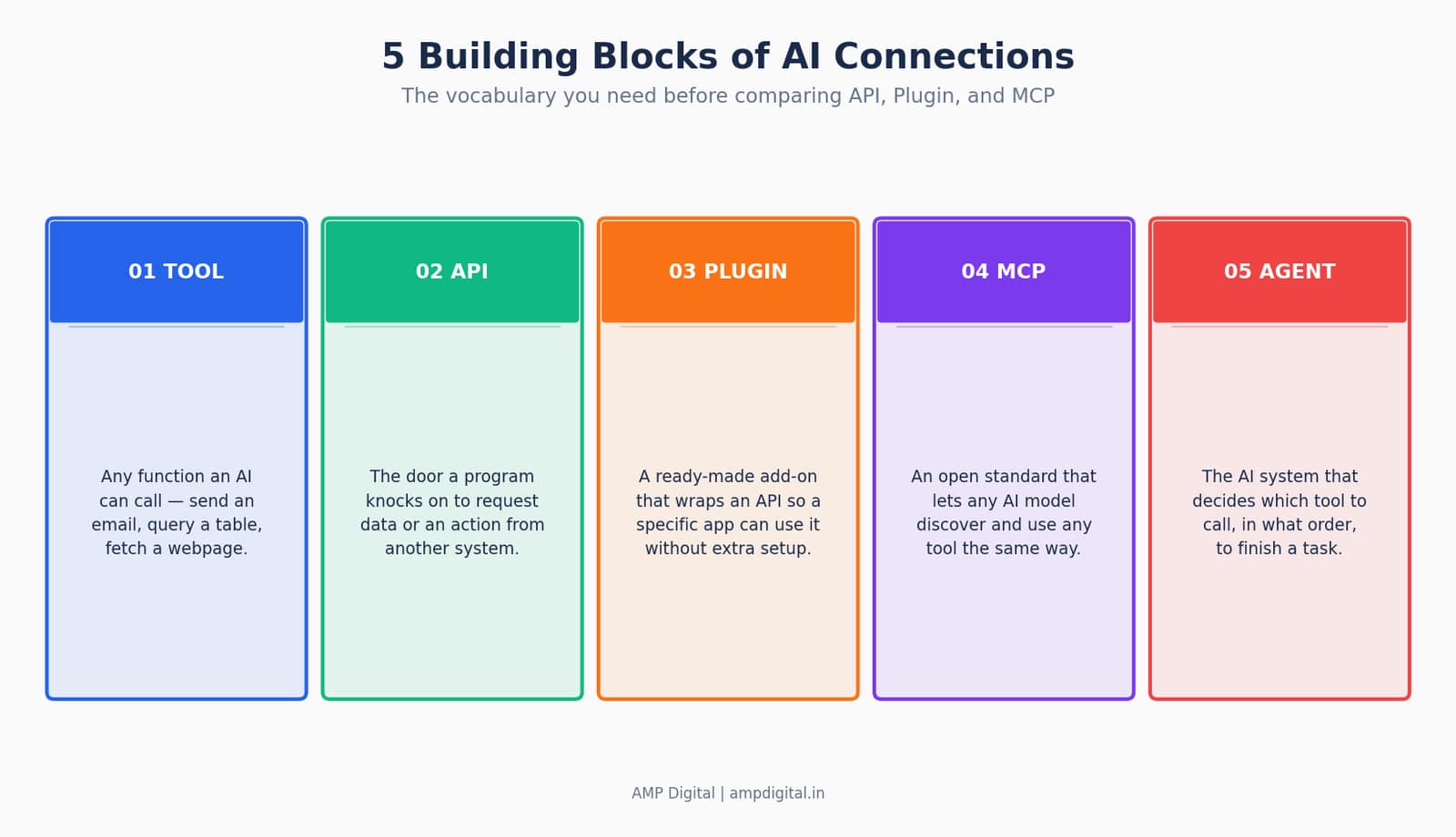
Figure 1. The five building blocks behind every AI-to-tool connection.
Layer | What It Is | Who Uses It | Example |
API | A defined set of rules for requesting data or actions from software | Developers, writing code | Google Maps API returns distance and directions |
Plugin | A pre-built add-on that wraps an API for one specific app | End users, no coding | A WordPress SEO plugin adds meta tags automatically |
MCP | An open protocol that lets any AI model discover and call any tool | AI agents and the people who use them | Claude connects to Google Drive through an MCP server |
2. Why This Matters in the 2026 AI World
It matters because AI stopped being just a chat window. In 2026, tools like Claude are expected to act — pulling a file, checking a database, updating a spreadsheet — not just talk about it. That shift from "AI that answers" to "AI that does" is exactly why API, Plugin, and MCP are suddenly everywhere in the same conversation.
The scale of the shift is easiest to see in raw adoption numbers. Anthropic open-sourced MCP on November 25, 2024, as an open standard for connecting AI assistants to the systems where data lives. Sixteen months later, monthly downloads of its official SDKs had grown from roughly 100,000 to 97 million — a growth curve most developer tools never come close to.
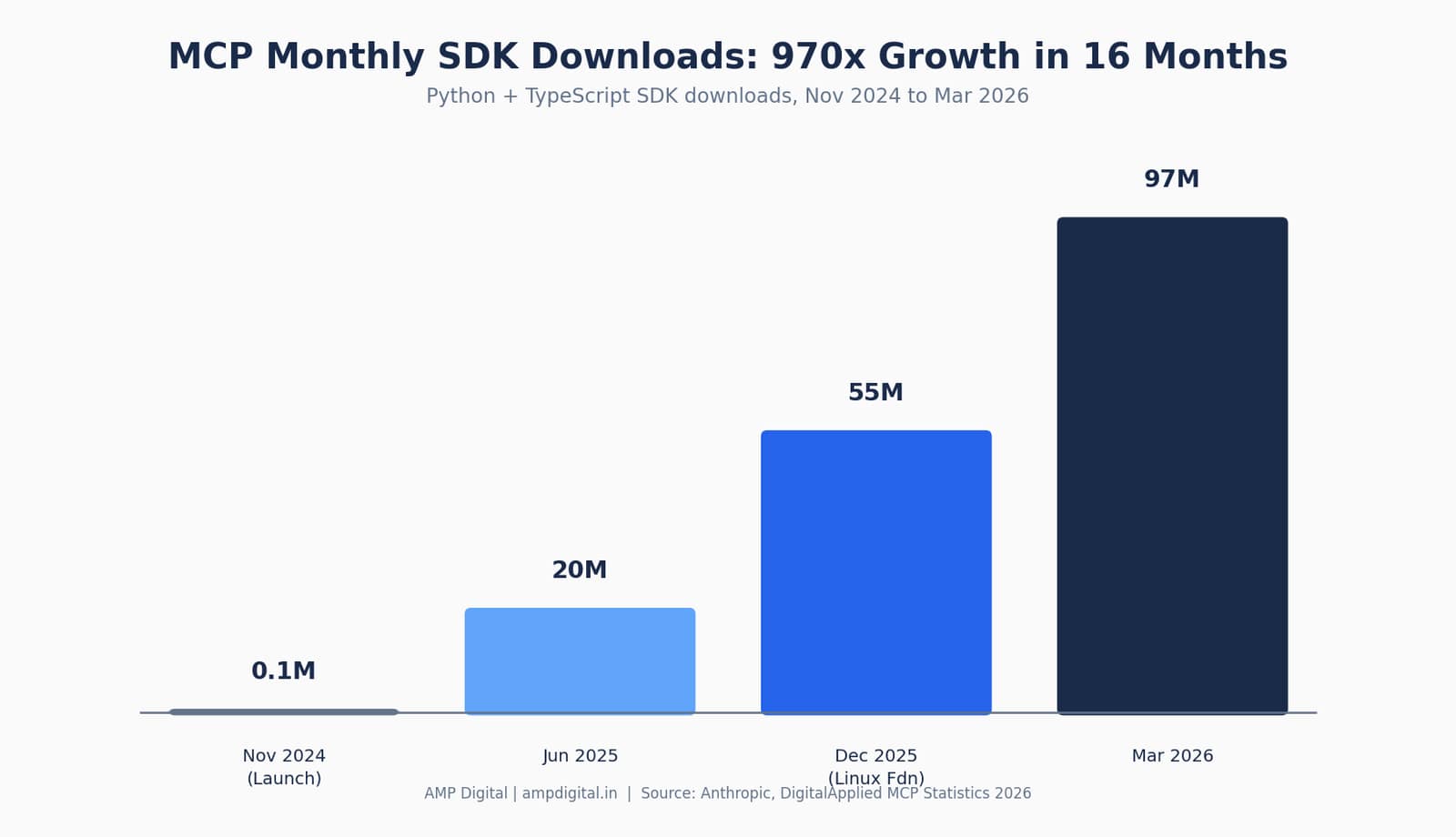
Figure 2. MCP SDK downloads scaled from launch to mainstream infrastructure in under a year and a half.
Key Stat
Anthropic reported more than 10,000 active public MCP servers at the time it donated the protocol to the Linux Foundation’s Agentic AI Foundation in December 2025.
By May 2026, independent estimates put Fortune 500 enterprise adoption at 28%.
“MCP is a good protocol and it’s rapidly becoming an open standard for the AI agentic era.”
— Demis Hassabis, CEO, Google DeepMind
For content creators, marketers, and small teams, this matters in a very practical way: the tools you already use — Notion, WordPress, Slack, Google Drive — are increasingly reachable by AI through MCP, without anyone on your team writing custom integration code. That is the promise this guide will help you evaluate.
3. What Is an API? (The Foundation)
An API (Application Programming Interface) is a set of rules that lets one piece of software ask another piece of software for information or action — like a restaurant door that only lets in orders written on the right form.
Picture a restaurant kitchen. You, the customer, cannot walk into the kitchen and grab food yourself. Instead, you tell the waiter what you want, the waiter takes your order to the kitchen in a format the kitchen understands, and the kitchen sends back your meal through the same waiter. An API is that waiter: a structured go-between that takes a request, passes it to a system, and returns a response.
How APIs work: requests and responses
- Your application sends a request to the API — for example, "give me the weather for Bengaluru."
- The API checks the request is valid and properly formatted (often using a key to confirm who is asking).
- The request reaches the underlying system (a weather database, a maps engine, a payment processor).
- The system processes it and sends a response back through the same API, usually as structured data (JSON).
- Your application reads that data and displays it, or acts on it.
Pro Tip
You interact with APIs every day without noticing. Checking a flight price, seeing a map inside a food delivery app, or logging in with "Sign in with Google" are all API calls happening behind the scenes.
Pros and cons for AI use
APIs are precise, fast, and battle-tested — developers have relied on them for two decades. But for AI agents specifically, raw APIs create friction: every API has its own authentication method, its own data format, and its own documentation. An AI model does not automatically know how to read any of that. Someone still has to write custom code connecting each API to each AI application, one pair at a time.
Real-world examples include the Google Maps API (used inside ride-hailing and delivery apps), and social platform APIs like the X API or Meta Graph API, which let third-party tools post updates or pull analytics. Developers love APIs because they are flexible and precise. AI agents, on the other hand, struggle without an extra translation layer — which is exactly the gap Plugins and, later, MCP were built to close.
4. What Is a Plugin? (The Ready-Made Add-on)
A Plugin is a pre-built extension that adds a specific capability to one specific application — like a stand mixer attachment that only fits one brand of mixer, or a browser extension that only works inside one browser.
If an API is the restaurant’s ordering system, a Plugin is a pre-printed order form for one dish that a regular customer keeps on hand — it saves time, but it only works at that one restaurant, for that one dish. Plugins wrap the complexity of an API into a simple, click-to-install package so a non-developer can use it in seconds.
How Plugins differ from raw APIs
The API does the technical work of moving data back and forth. The Plugin is the packaging around that work — built for one specific host application, with its own installation flow, settings screen, and permissions. You do not write code to use a Plugin; you install it and configure a few toggles.
Everyday Tool | What the Plugin Adds | Built On Top Of |
WordPress SEO plugin | Auto-generates meta tags and sitemap | WordPress REST API |
Browser ad blocker | Filters requests before pages load | Browser extension API |
ChatGPT plugin (legacy) | Lets the chatbot book travel or fetch data | Third-party service API |
Google Docs add-on | Grammar or citation checking inside the doc | Google Workspace API |
“DevOps teams now enjoy a litany of new ways to take advantage of AI.”
— Derek Ashmore, AI Enablement Principal, Asperitas (CIO.com)
Strengths and limitations
Plugins are genuinely easy to use — that is their whole appeal. No coding, no configuration files, just install and go. The trade-off is that a Plugin is only ever as smart, current, or connected as the one app it was built for. It cannot discover new tools on its own, it usually cannot talk to other Plugins, and when the host platform changes its rules, the Plugin can break overnight. OpenAI’s original ChatGPT plugin store, launched in 2023, is the clearest example: it required a separate plugin for every single service and was eventually phased out in favor of more flexible approaches.
5. What Is MCP (Model Context Protocol)? (The Game Changer)
MCP is an open standard, introduced by Anthropic in November 2024, that lets any AI model discover, connect to, and use any external tool or data source through one shared set of rules — widely nicknamed the "USB-C for AI."
Before USB-C, every device needed its own cable: one plug for your phone, another for your camera, a third for your headphones. MCP solves the exact same problem for AI. Instead of a developer writing one custom connector for every single AI-model-plus-tool pairing, they write one MCP server for a resource — a database, Slack, GitHub, an internal API — and every MCP-compatible AI application can talk to it immediately.
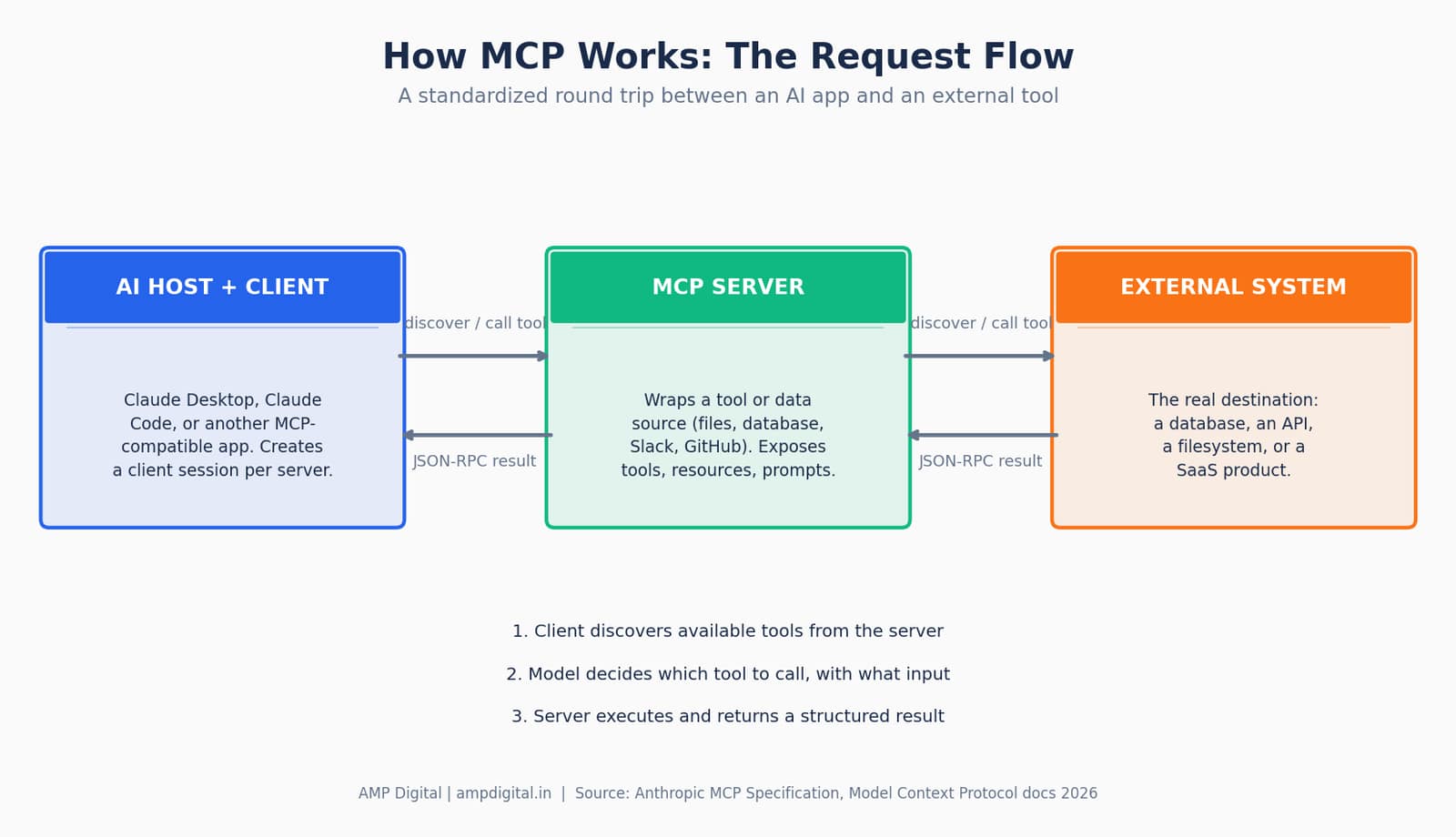
Figure 3. MCP’s client-server architecture: the AI host discovers tools on a server, calls them, and receives structured results back.
The problem MCP was built to solve
Engineers call the old approach the "M×N problem": if you have M different AI applications and N different tools, you potentially need M multiplied by N custom integrations. Five AI apps connecting to twenty tools is one hundred separate pieces of code to build and maintain. MCP collapses that math into "M+N" — build the protocol once per app, build it once per tool, and every combination just works.
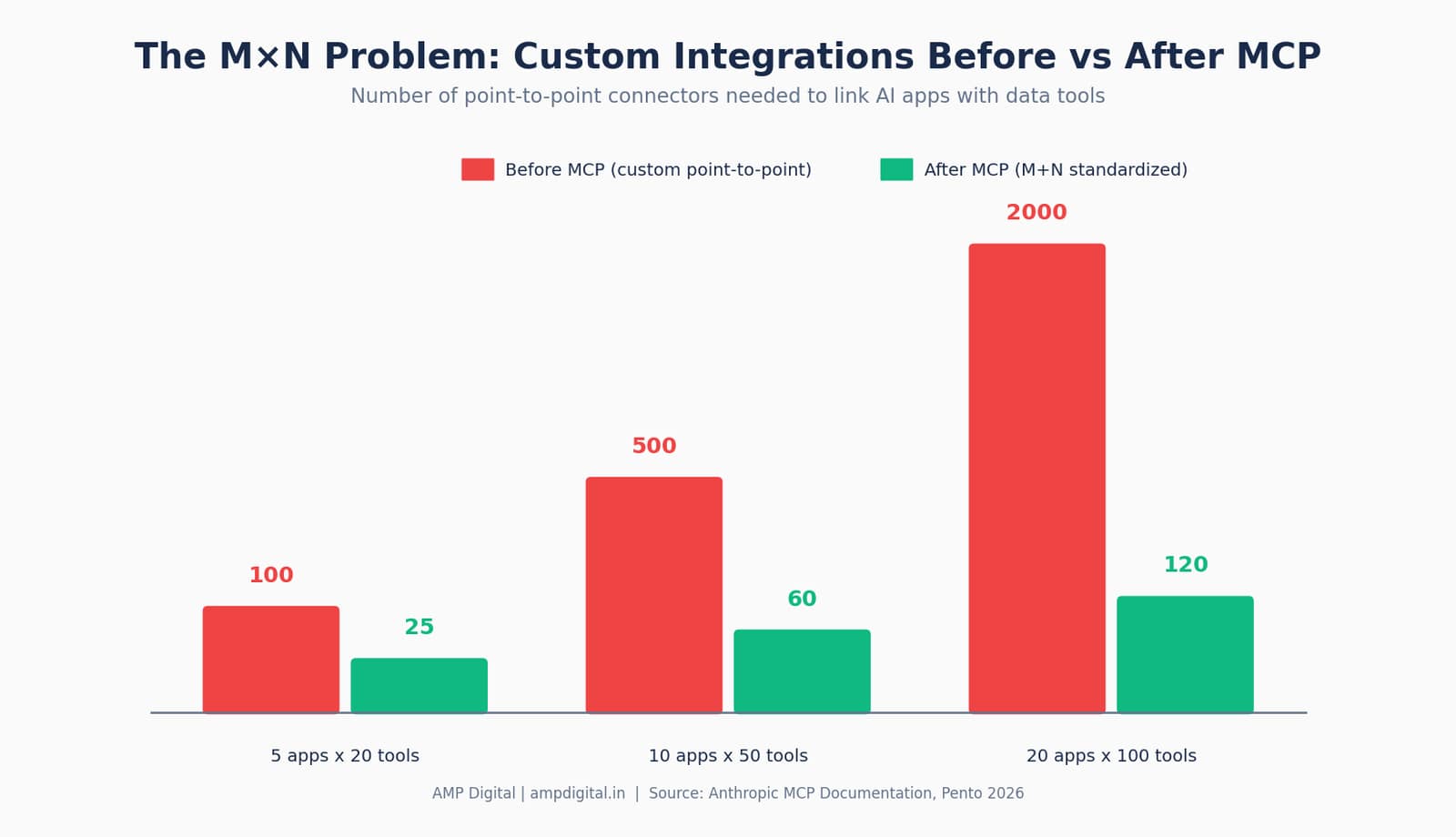
Figure 4. As the number of apps and tools grows, custom point-to-point integrations scale far faster than MCP’s standardized approach.
“People love MCP and we are excited to add support across our products.”
— Sam Altman, CEO, OpenAI
Key features of MCP
- Dynamic discovery — an AI client asks a server what tools it offers, instead of a developer hard-coding the list in advance.
- Standardization — one protocol (built on JSON-RPC) works the same way regardless of which AI model or which tool is on the other end.
- Two-way communication — servers can send structured results, and in newer versions, even follow-up requests back to the client.
- Open governance — donated to the Linux Foundation’s Agentic AI Foundation in December 2025, so no single company controls the standard.
Update
MCP is not owned by Anthropic anymore. As of December 2025, it is governed by the Agentic AI Foundation under the Linux Foundation, with OpenAI, Google, Microsoft, AWS, Block, and Bloomberg among its founding and supporting members.
6. MCP vs API vs Plugin: Side-by-Side Comparison
In short: APIs are the foundation developers build on, Plugins are quick add-ons for one app, and MCP is the universal layer that makes any tool AI-agent-ready. MCP does not replace APIs — most MCP servers call an existing API behind the scenes. What MCP replaces is the custom glue code that used to sit between an AI model and that API.
Aspect | API | Plugin | MCP |
Best for | Developers writing integrations | End users wanting quick features | AI agents needing many tools |
Ease of use | Needs coding knowledge | Plug and play, no code | Plug and play once a server exists |
Flexibility | High — fully customizable | Medium — locked to one app | High — works across any MCP client |
Discovery | Manual — developer reads docs | Manual — user browses a store | Dynamic — AI finds tools itself |
Future relevance | Foundation — always needed | Useful add-on, platform-locked | Rising standard for agentic AI |
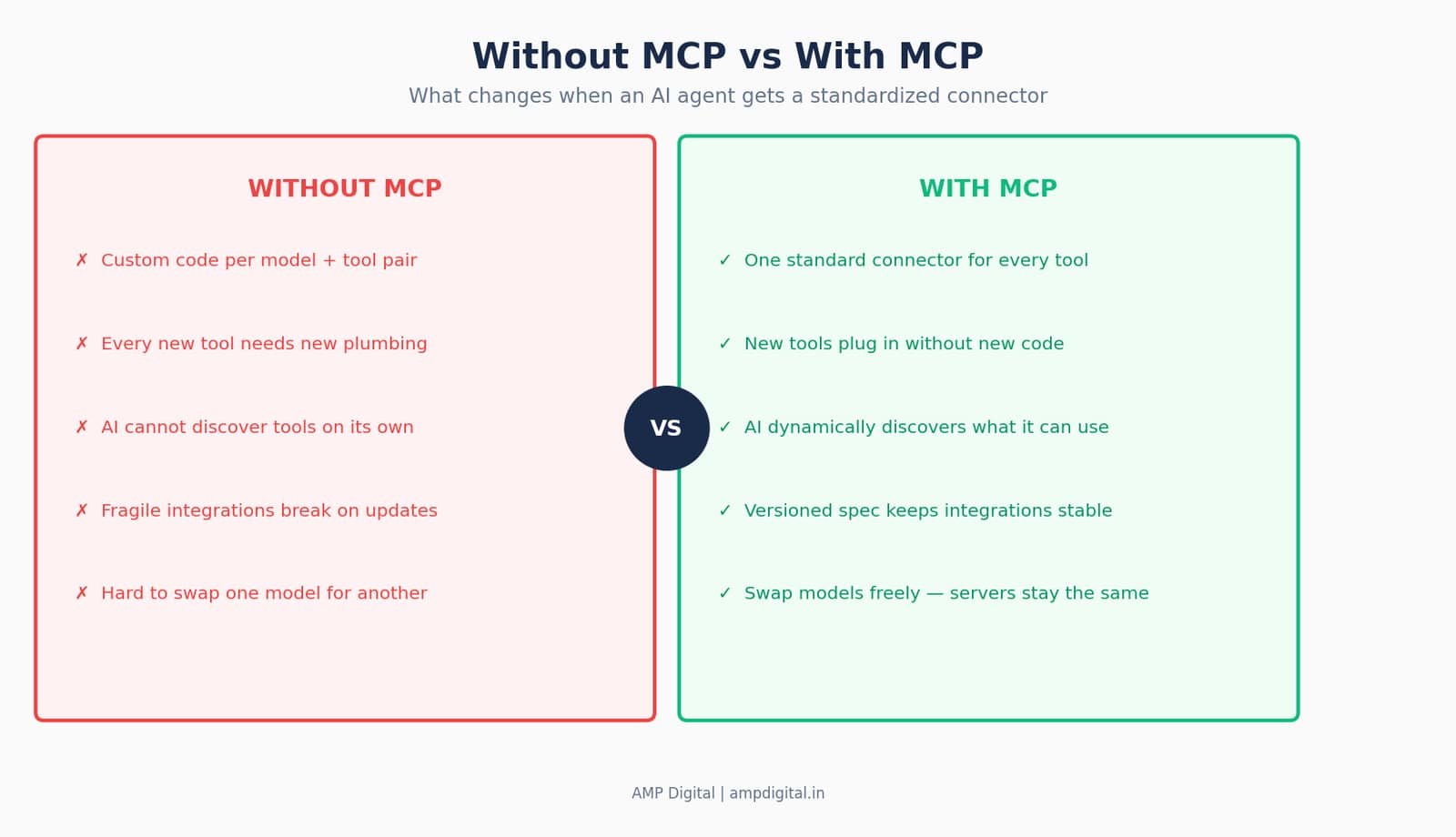
Figure 5. The practical difference an AI agent experiences with and without MCP in place.
Best Practice
Remember the relationship, not just the comparison: MCP doesn’t replace APIs — it makes them AI-friendly. A well-designed MCP server is usually just a thin, standardized wrapper around an API that already exists.
7. Common Mistakes Beginners Make
The most common mistake is treating API, Plugin, and MCP as interchangeable words for "AI integration." They solve related but different problems, and picking the wrong one wastes setup time and, in some cases, creates real security exposure.
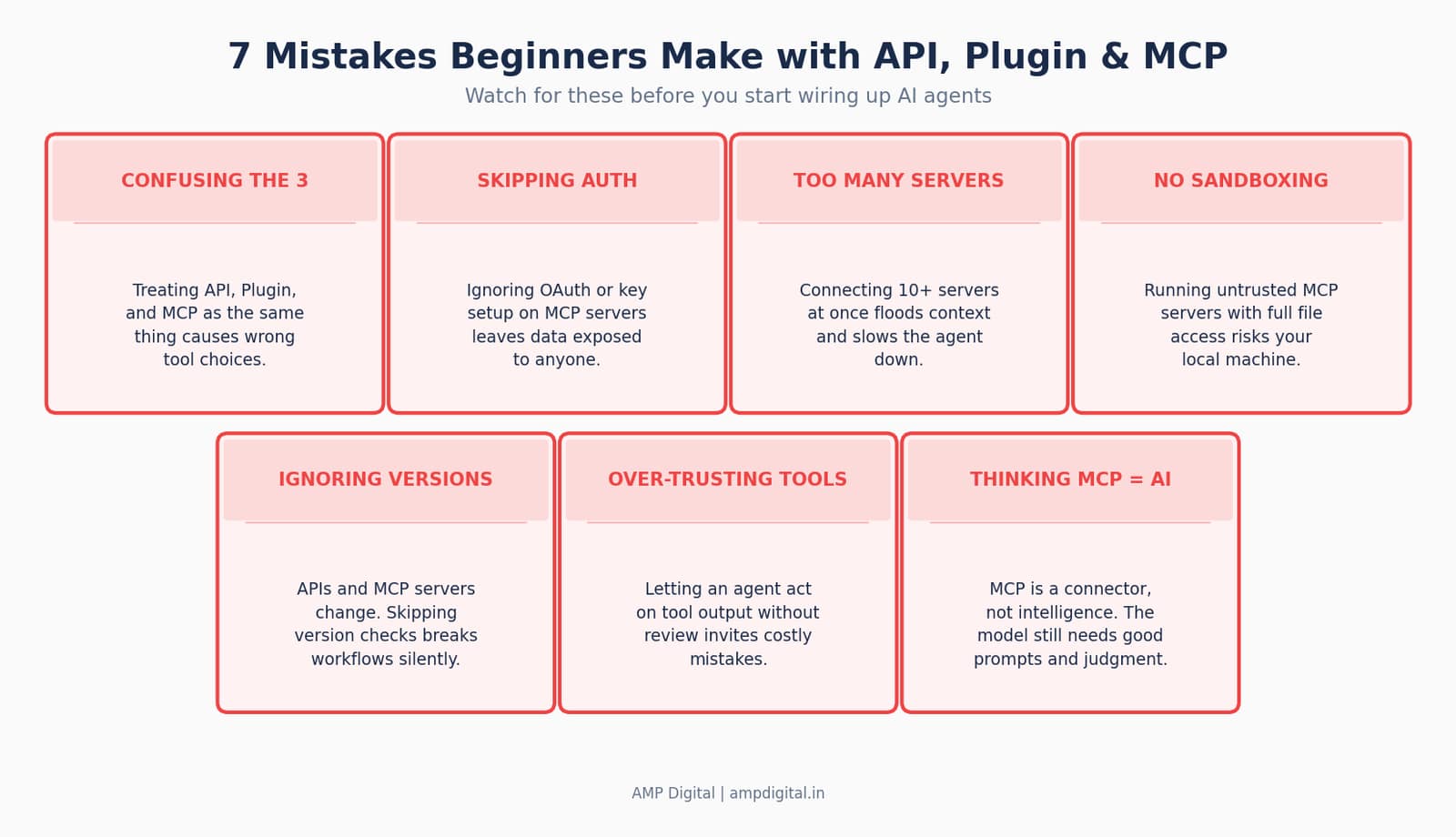
Figure 6. Seven mistakes to watch for as you start connecting AI agents to real tools.
Warning
MCP servers can request broad permissions — file system access, database credentials, API keys. Security researchers logged more than 30 CVEs against MCP implementations in the first two months of 2026 alone. Only connect servers from sources you trust, and review what permissions you are granting.
Mistake | Why It Hurts | Simple Fix |
Connecting too many servers at once | Floods the model’s context, slows responses | Start with one or two, add gradually |
Skipping authentication setup | Leaves data exposed to unauthorized access | Always configure OAuth or API keys properly |
Assuming MCP equals intelligence | MCP only connects tools; it doesn’t reason | Pair MCP with clear prompts and instructions |
8. How Beginners Can Start Experimenting Today
The fastest way to understand MCP is to use it once. You do not need to write a line of code to connect Claude to a single tool and watch it discover what that tool can do.
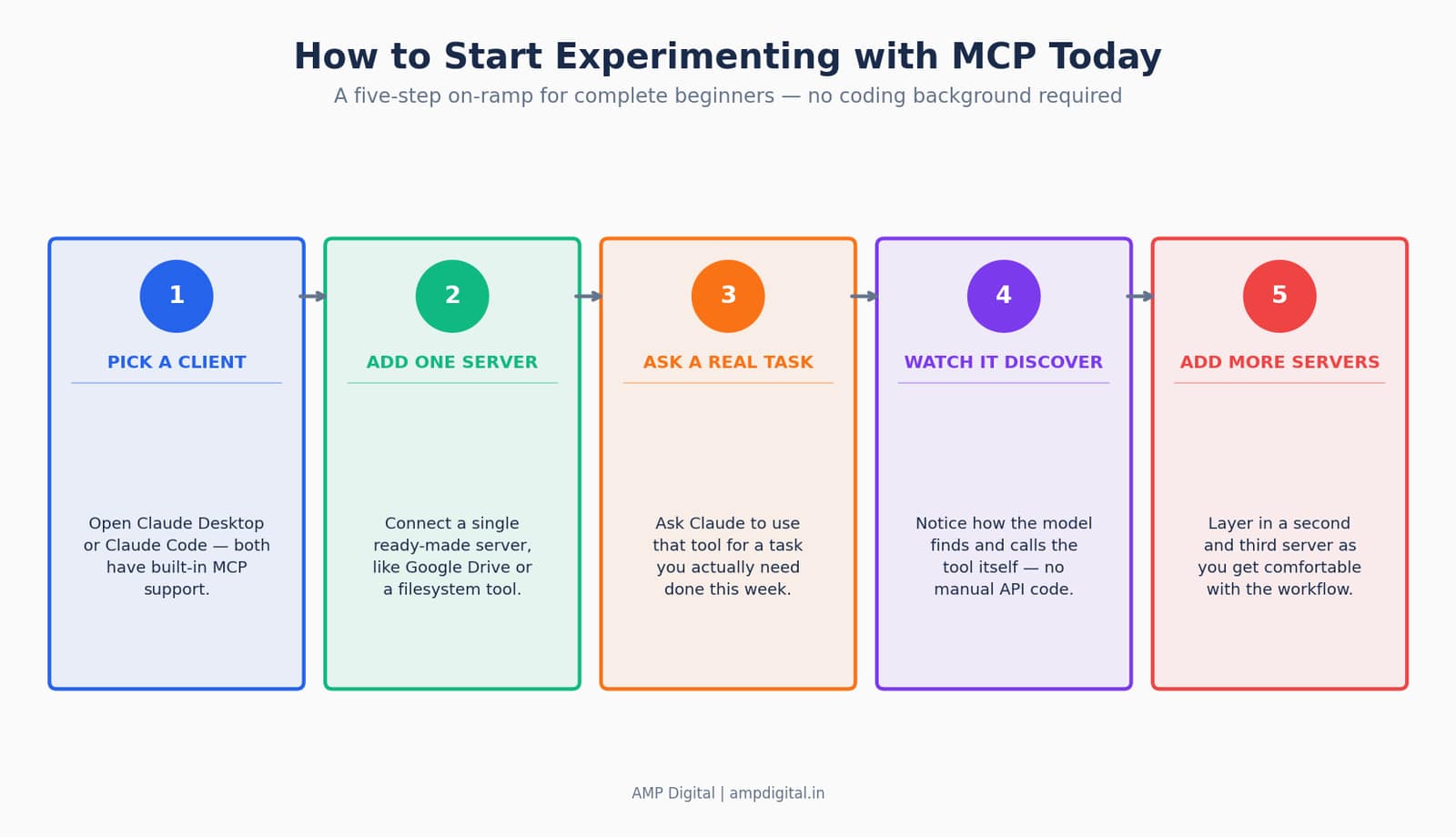
Figure 7. A five-step on-ramp for trying MCP for the first time.
Best Practice
Tools to try first: Claude Desktop or Claude Code with a single reference MCP server (Google Drive, filesystem, or GitHub). These are maintained, well-documented, and low-risk starting points for a beginner.
Once one server feels comfortable, the natural next step is connecting a second — for example, pairing a research server with a writing or content tool, so an agent can pull source material and draft in the same conversation. This is exactly the kind of workflow marketing and content teams are beginning to build around MCP in 2026.
9. Real-World Use Cases and Benefits
MCP is already powering AI agents inside real businesses, not just demos. Claude Desktop connecting to local files, databases, and internal tools was the first mainstream use case, and it has since expanded into finance, engineering, and content operations.
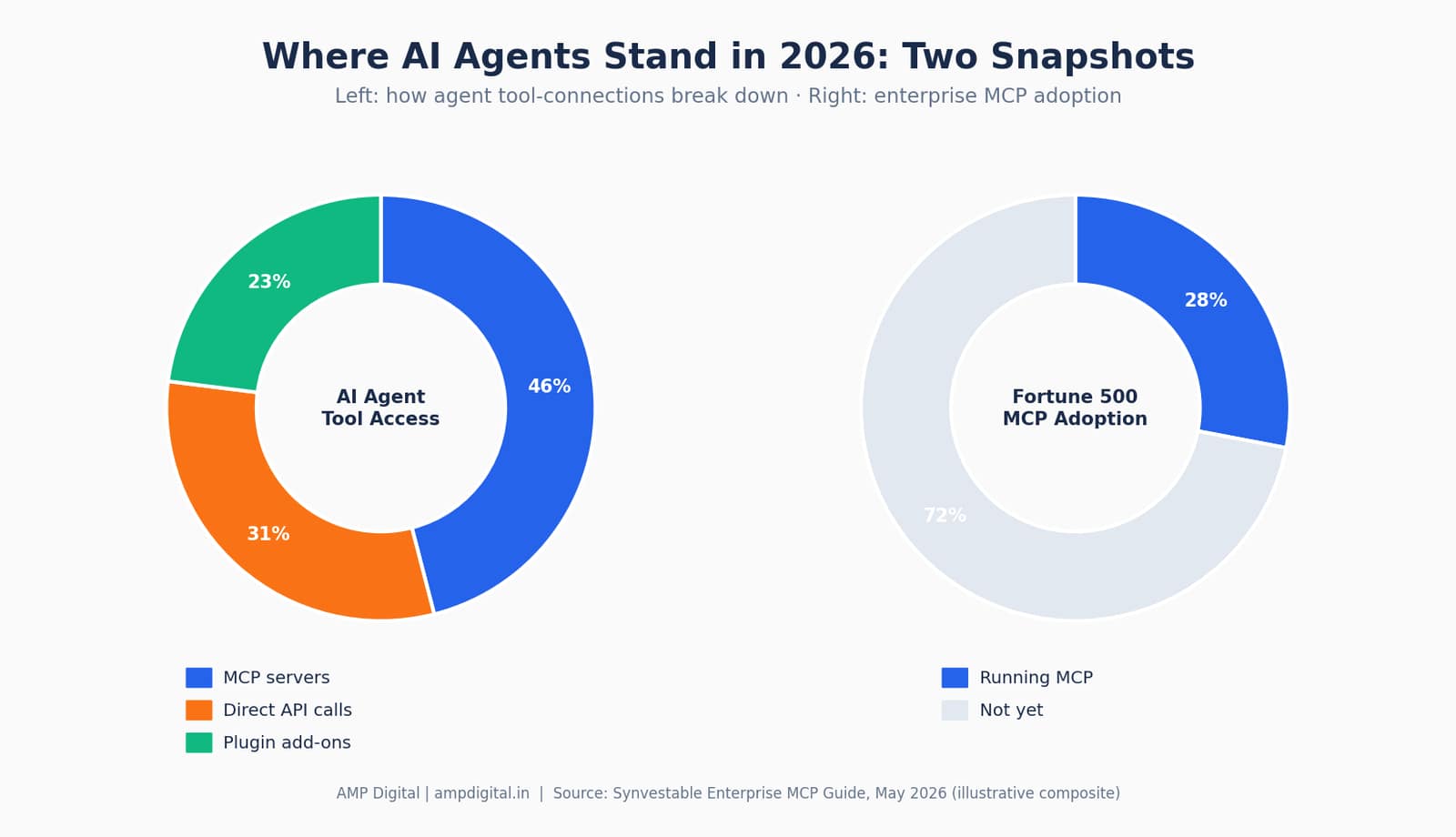
Figure 8. An illustrative snapshot of how AI agents source their tools today, and how far enterprise MCP adoption has reached.
Organization | How They Use MCP | Reported Impact |
Block (Square) | Company-wide MCP integration via the Goose agent | 98.7% reduction in token usage company-wide |
Raiffeisen Bank | MCP-integrated AI for risk management workflows | 40% improvement in risk assessment speed |
Pinterest Engineering | Domain-specific MCP servers for Presto, Spark, Airflow behind a central registry | Human-in-the-loop approval for sensitive data operations |
“As adoption grows among leading platforms, it brings us closer to agentic AI that works seamlessly across the tools people already use.”
— David Soria Parra, Co-creator of MCP, Anthropic
Impact on marketing and content creation
For content and marketing teams, MCP servers now exist for automated research, keyword pulling, CMS publishing, and analytics reporting — meaning an AI agent can research a topic, draft content, and check performance data inside one continuous workflow instead of switching between five separate tools by hand. WordPress released an official MCP Adapter in February 2026, and MCP marketplaces now list hundreds of servers specifically for marketing automation.
Impact on personal branding
For individual creators and consultants, MCP lowers the technical bar for building an AI-assisted workflow. Instead of learning to code an integration, a solo marketer can connect a research server and a scheduling server to their AI assistant and let it draft, check, and queue content — work that used to require a developer’s help.
Current challenges and adoption status
Adoption is real but uneven. Roughly 28% of Fortune 500 companies have deployed MCP servers as of mid-2026, and the remaining majority are still evaluating security, authentication, and governance before rolling it out broadly. The protocol itself is still maturing — enterprise-grade single sign-on support and a fully verified server registry are both still on Anthropic’s 2026 roadmap.
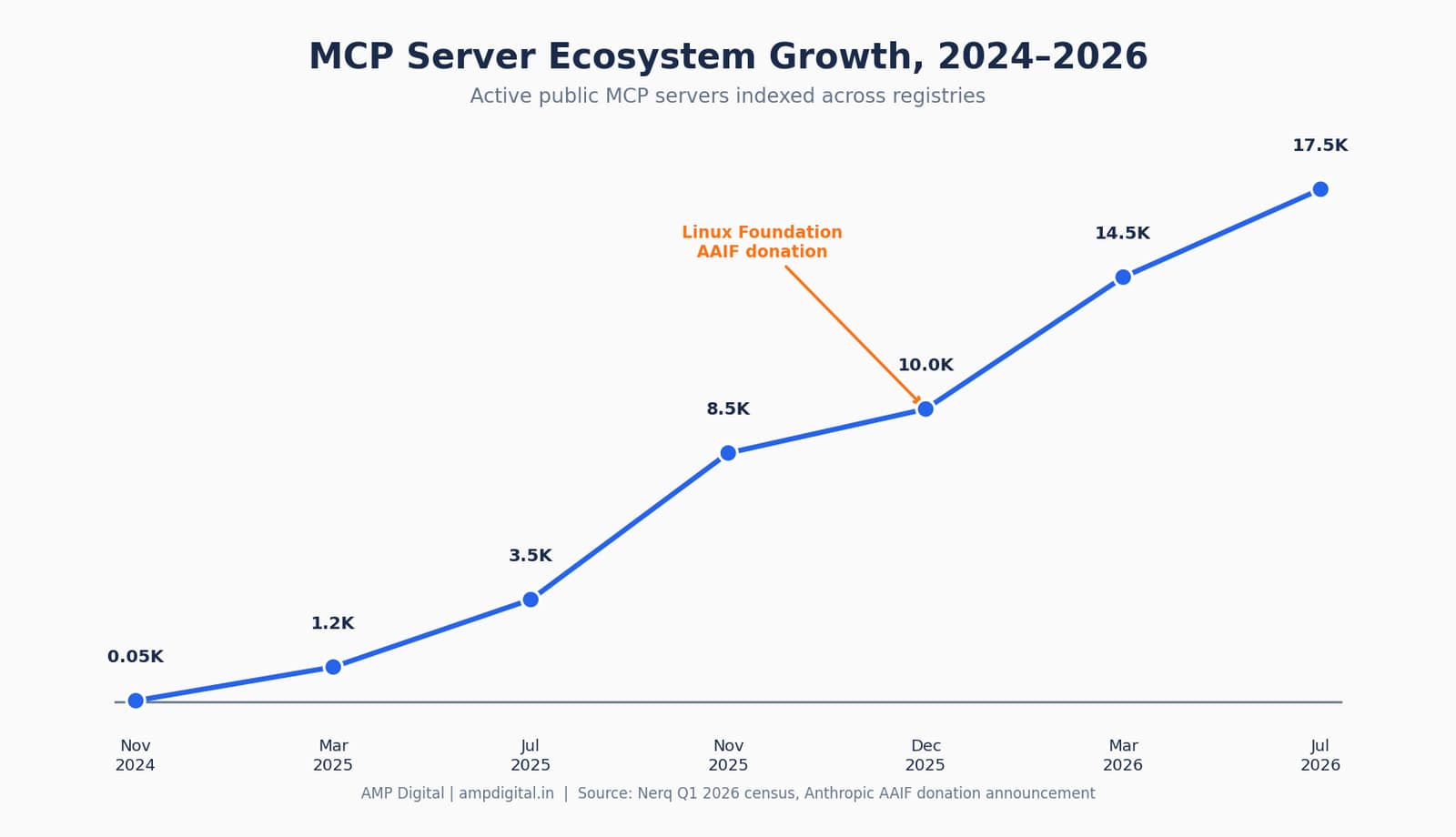
Figure 8b. The MCP server ecosystem kept accelerating even after the December 2025 governance handover to the Linux Foundation.
10. Why This Matters for You: The Future of AI Agents
MCP is the connective tissue behind the next wave of autonomous AI agents — systems that do not just answer one question but complete multi-step tasks by chaining several tools together on their own.
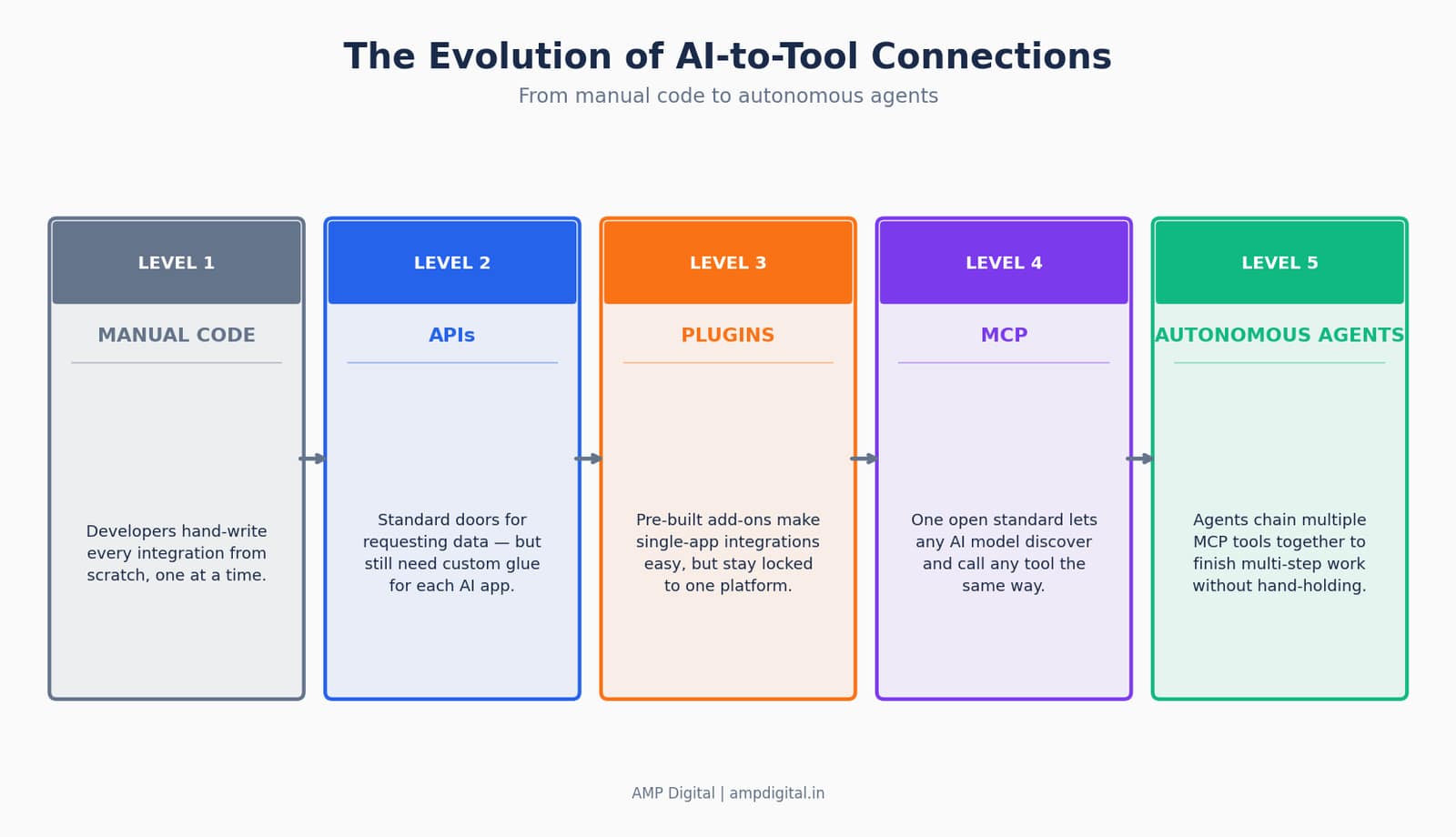
Figure 9. How AI-to-tool connections have evolved from hand-written code to autonomous, multi-tool agents.
Anthropic’s 2026 roadmap for MCP focuses on three areas that will matter directly to everyday users: stronger enterprise authentication (so companies trust it with sensitive data), multi-agent coordination (so one AI agent can call another agent as if it were just another tool), and a verified server registry (so beginners can tell a trustworthy MCP server from a risky one at a glance).
Update
Watch for MCP Apps, announced in January 2026 — the first official extension to the protocol, which lets MCP responses render as interactive interfaces instead of plain text. This is an early sign of MCP expanding beyond data-fetching into full interactive experiences.
Practical takeaways: follow MCP developments through Anthropic’s own documentation and the growing MCP server registries, test one simple integration this month, and keep an eye on which of your everyday tools — Notion, Slack, your CMS — ships official MCP support next. The beginners who start experimenting now will have a real head start as agentic workflows become the default.
Frequently Asked Questions
Is MCP the same thing as an API?
No. MCP is not a replacement for APIs — it is a standardized layer that sits on top of them. Most MCP servers call an existing API behind the scenes; MCP simply gives AI models one consistent way to discover and use that API, instead of needing custom code for every model-and-tool pairing.
Do I need to know how to code to use MCP?
No, not to use an existing MCP server. Connecting Claude Desktop to a ready-made MCP server, like Google Drive or GitHub, typically takes a short configuration step with no programming required. Building your own MCP server from scratch does require development skills.
What is the difference between a ChatGPT plugin and MCP?
A ChatGPT plugin was built to work inside one specific chat application and one specific service. MCP is an open, cross-vendor standard: a single MCP server can be used by Claude, ChatGPT, Gemini, and other MCP-compatible AI applications without being rebuilt for each one.
Is MCP secure?
MCP itself is a protocol, not a guarantee of security — safety depends on which servers you connect and what permissions you grant them. Security researchers identified dozens of vulnerabilities across early MCP implementations in 2026, which is why the roadmap for the protocol prioritizes stronger authentication and a verified server registry.
Which companies support MCP in 2026?
Anthropic, OpenAI, Google, Microsoft, AWS, and Salesforce all ship first-party MCP support, alongside developer tools like Cursor, VS Code, Replit, and Zed. MCP is governed by the Agentic AI Foundation under the Linux Foundation as of December 2025, making it a vendor-neutral standard rather than one company’s product.
Will MCP replace Plugins entirely?
Not immediately, but its scope is broader. Plugins remain useful for simple, single-app add-ons that do not need AI-agent discovery. MCP is aimed specifically at AI agents that need to work across many tools dynamically, which is why platform-specific plugin ecosystems are increasingly being rebuilt as MCP servers instead.
How is MCP different from Anthropic’s Skills?
MCP connects an AI model to external tools and live data. Skills are lightweight, on-demand instructions and scripts that teach a model how to use those tools well. Many practitioners describe MCP as the highway and Skills as the driving manual — they work together rather than compete.
Conclusion
APIs are the foundation — the doors developers have relied on for two decades. Plugins are the ready-made add-ons that make one specific app more useful with zero setup. MCP is the newest layer: an open standard that lets any AI model discover and use any tool the same way, turning isolated chatbots into genuinely capable agents. MCP does not erase the other two — it stands on top of APIs and pushes past the limits of Plugins, and understanding all three is what makes the 2026 AI landscape make sense.
Summary
API = the door for requesting data (built for developers).
Plugin = the ready-made key to one specific door (built for one app).
MCP = the universal keyring any AI model can use on any door (built for agents).
Start small: connect one MCP server to Claude this week and see it in action.
Which one are you most excited to learn more about — building your first MCP connection, or exploring what Plugins can still do best? Share your thoughts in the comments, and if you are building AI-agent workflows for your own content or business, this is only the first post in our ongoing OpenClaw and AI-agent series on the AMP Digital blog. Connect with Guda Praveen Kumar on X for more breakdowns like this one.
References
- Anthropic — "Introducing the Model Context Protocol," November 25, 2024.
- Anthropic — MCP donation to the Agentic AI Foundation, Linux Foundation, December 9, 2025.
- DigitalApplied — "MCP Adoption Statistics 2026: Model Context Protocol," May 24, 2026.
- DigitalApplied — "MCP Hits 97M Downloads: Model Context Protocol Guide," March 9, 2026.
- Synvestable — "Model Context Protocol for Enterprise: 2026 Deployment Guide," May 4, 2026.
- Knak — "MCP Adoption in 2026: What Marketers Need to Know," April 16, 2026.
- Zuplo — "One Year of MCP," November 24, 2025.
- Pento — "A Year of MCP: From Internal Experiment to Industry Standard," 2026.
- Google Cloud Blog — "Announcing official MCP support for Google services," December 10, 2025.
- Wikipedia — "Model Context Protocol," accessed July 2026.
- ChatForest — "The MCP Ecosystem in 2026," April 2, 2026.
- Medium / Gary Weiss — "The Rise of MCP: Protocol Adoption in 2026," February 23, 2026.